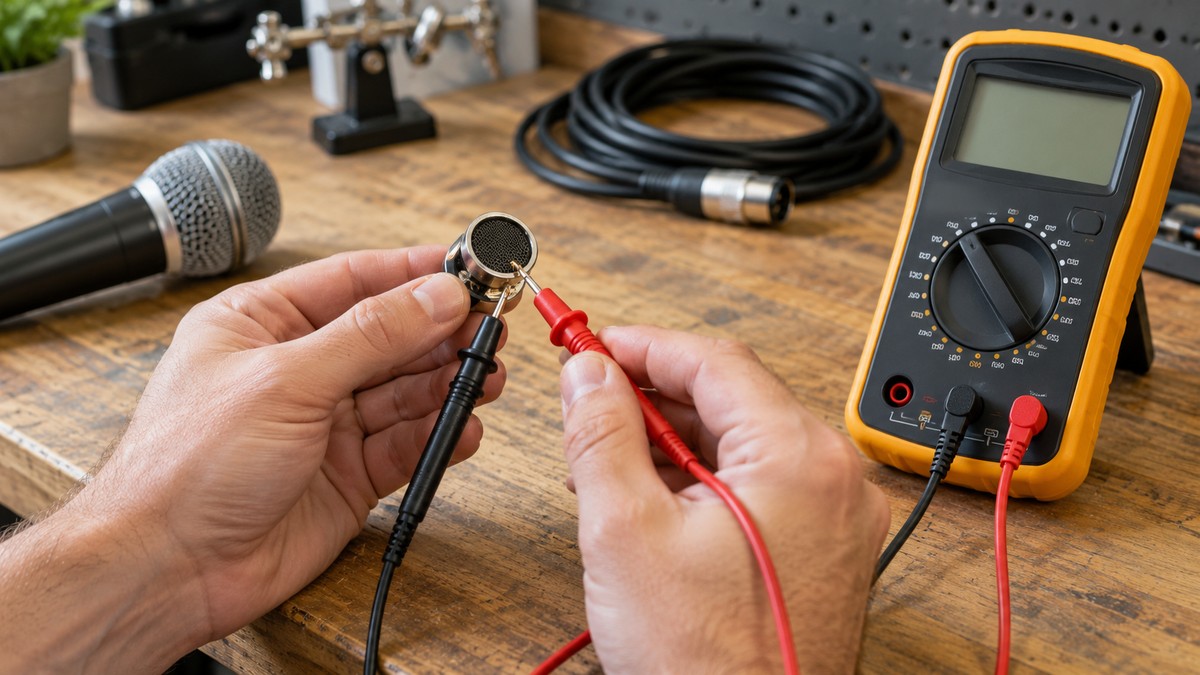
How to Test a Microphone With a Multimeter
As an Amazon Associate we earn from qualifying purchases.
How to test a microphone with a multimeter means two bench checks on a passive dynamic microphone that is disconnected from everything else: the DC resistance of its coil between the two signal pins, and the continuity of the cable and connector. Both checks use the meter’s resistance and continuity functions, with the circuit de-energized. The sources we opened do not give an expected resistance for any microphone, so this guide explains how to take each reading and what the sources let you conclude from it.
Electrical safety first
Work on mains circuits can kill. OSHA’s publication on controlling electrical hazards says a shock can range from a slight tingling sensation to immediate cardiac arrest. The steps use a passive microphone on a bench, and they do not cover mains, outlets, panels or service wiring or any powered equipment.
Before you measure anything, check that the meter’s CAT rating suits the circuit you are testing. Fluke advises choosing a meter rated for the highest measurement category you might encounter, with a voltage rating that matches or exceeds it. A University of Washington guide on electrical test equipment says the meter must be rated for the category of the work or higher. Read the rating from the meter’s listing or the manufacturer’s manual, since ratings are usually printed near the input jacks. Fluke’s IEC category page places CAT II at single-phase receptacle-connected loads, CAT III at fixed distribution equipment such as switchgear, and CAT IV at the utility connection. If the listing does not state a CAT rating for the meter, do not use that meter on mains.
Panel and service work belongs to a licensed electrician. OSHA’s rule limits work on electric circuit parts that have not been deenergized to qualified persons, and the University of Washington’s electrical hazards guide says only qualified, authorized employees should work on electrical equipment and systems. The sources we opened do not use the word licensed, so the licensed-electrician rule is this guide’s own safety rule.
Phantom power adds its own rule. Beyerdynamic explains that phantom power is 48 V DC applied to both signal conductors of the XLR plug, pins 2 and 3. The steps below measure those same pins. Do not test a phantom-powered or electret microphone while it is connected to power. This guide does not cover that case.
Quick answer
- Turn phantom power off at the mixer, then unplug the microphone from any amplifier, preamp or recorder.
- Set the meter to resistance (Ω) and measure between pins 2 and 3 at the microphone’s connector. Record the value. The sources do not give a pass number.
- Check each cable conductor end to end, then check that no two pins are shorted together.
- A rated impedance on a listing is not stated as a DC coil reading, and the sources we opened do not say the two match.
What you need
A digital multimeter with a resistance (Ω) setting and a continuity mode. Fluke says the continuity mode is usually combined with the resistance setting, and some meters need a separate button to turn it on. Plug the black lead into COM and the red lead into the VΩ jack. When you finish, remove the red lead first.
Fluke also advises the lowest range for components that should read a low resistance, such as electrical connections. A cable connector is that kind of component, so use the lowest ohms range for the cable checks. If you want background on the continuity setting first, read our guide on how to use a continuity tester, and for meters with an ohms setting, see our guide to ohm meters.
Step 1: Turn off phantom power and disconnect the microphone
At the mixer, switch phantom power off before you unplug anything. Beyerdynamic’s guidance is to wire microphones first and switch phantom on afterward, and for removal to switch phantom off first and then unplug. Syn-Aud-Con’s topic on microphone lines also says to disconnect each mic line from the mixer before checking it with an ohmmeter.
Fluke says the component under test should be isolated from the other parts of the circuit, and that the test leads are connected with the circuit de-energized. For the bench, the microphone sits alone and its cable is unplugged from gear at both ends.
Older microphones deserve extra care. Beyerdynamic warns that they sometimes have different plug connectors and internal wiring. If the microphone is old or unfamiliar, check any wiring documentation you have before you measure. The sources we opened do not describe a wiring test for older microphones.
Step 2: Measure the coil resistance between pins 2 and 3
A University of Iowa handout describes a dynamic microphone as a moving-conductor design, in which a coil attached to the diaphragm moves in the fixed field of a permanent magnet. Neutrik’s XLR FAQ says the wiring follows the IEC 60268-12 standard. Pin 1 is the shield and ground, pin 2 is live or hot (+), and pin 3 is return or cold (-). Electro-Voice’s DC-One manual uses the same mapping and says cable shielding must connect to pin 1.
| Pin | Role in the sources | Used in this guide |
|---|---|---|
| 1 | Shield and ground | Continuity and shorts checks |
| 2 | Live or hot (+) | Coil measurement and continuity checks |
| 3 | Return or cold (-) | Coil measurement and continuity checks |
Shure’s SM58 manual says positive pressure on the diaphragm produces a positive voltage on pin 2 with respect to pin 3. The microphone’s output therefore appears across pins 2 and 3. This guide measures the coil resistance between those two pins at the microphone’s connector. The sources we opened do not show the internal wiring of any specific microphone, so a reading taken this way may include more than the coil alone.
Set the meter to the resistance (Ω) function. Touch one probe to pin 2 and the other to pin 3. Fluke says the position of the leads is arbitrary as long as the part is isolated from the rest of the circuit, so the pins, not the meter, decide where the probes go. Note the reading. Fluke also notes that the display may show OL when the probes are separated, and the sources do not say what an OL reading means for a microphone.
The value itself needs care. The sources we opened do not give a DC resistance for any dynamic microphone coil, so this guide has no normal range to compare against. Shure’s live sound guide describes output impedance as roughly equal to the electrical resistance of the output, and gives 150 to 600 ohms for low impedance. Its glossary gives 50 to 600 ohms. The SM58 spec sheet lists a rated impedance of 150, with 300 as the actual figure, and the SM58 manual lists an output impedance of 300. The sources do not say how they were measured, or whether a meter reading between pins 2 and 3 would land near them.
Step 3: Check the cable end to end
Switch the meter to continuity mode. Fluke’s continuity guide says the meter beeps when it detects a complete path and stays silent when the circuit is open. Violet Recording’s cable guide describes the same sequence for an XLR cable: touch one probe to pin 1 on the male end and the other to pin 1 on the female end, then repeat for pin 2 to pin 2 and pin 3 to pin 3.
Violet says a good pin should read as continuous, with a beep or near-zero ohms. Fluke explains that the beep depends on the resistance of the component and on the meter’s range setting. Its example says that on a 400.0 ohm range, a meter typically beeps at 40 ohms or less. Because the threshold varies with range and model, check your meter’s manual before you judge a reading that is not a clear beep.
Flex the cable while the probes stay on one pin pair. Violet says a beep that cuts out or flickers while you flex the cable points to an intermittent break, often where the cable enters the connector. Keep the probes firmly on the pins, because a loose probe can look like an intermittent fault.
Step 4: Check for shorts between pins
With the cable still unplugged from gear, check each cross-pin pair at the same end: pin 1 to pin 2, pin 1 to pin 3, and pin 2 to pin 3. Violet says each pair should read open, with no beep. A beep means two conductors are shorted together.
Syn-Aud-Con’s topic also tells the reader to disconnect each mic line from the mixer before using an ohmmeter to look for shorts. Its check runs from the conductors to building ground rather than between pins, so it supports the order of work but not the pin-to-pin test itself. Violet also links a short between a signal pin and the shield to hum, low output or a dead channel. That is a symptom list from one guide, not a measurement.
Reading the results
| Check | Where | What the opened sources say |
|---|---|---|
| Coil resistance | Pins 2 and 3 at the microphone connector | No expected value is given in any opened source |
| Conductor continuity | Pin 1 to 1, 2 to 2 and 3 to 3, end to end | Beep or near-zero ohms (Violet) |
| Cross-pin shorts | Pins 1 to 2, 1 to 3 and 2 to 3 at one end | Open, no beep (Violet) |
| Shield connection | Pin 1 at each end | Shielding connects to pin 1 (Electro-Voice DC-One manual) |
According to Violet’s guide, a conductor that reads open when it should be continuous is broken. A cross-pin pair that beeps is shorted. Violet also warns that a joint can beep yet read well above near-zero ohms. The sources we opened do not give a numeric limit for a good cable, so a high reading is a reason to inspect the joint, not a measured pass or fail.
Common mistakes
- Testing with phantom power still on, or with the microphone still plugged into a mixer. Beyerdynamic’s order is to switch phantom off before unplugging, and Fluke’s method assumes a de-energized circuit.
- Reading a listing’s rated impedance as the coil’s DC resistance. The sources do not connect the two figures.
- Swapping pins 2 and 3. Violet says a pin 2 and pin 3 swap reverses polarity, and the SM58 manual ties positive voltage to pin 2.
- Skipping the cross-pin short checks. Violet warns that a cable can read continuous on all three pins and still have two conductors shorted.
- Using a high range for connector checks. Fluke advises the lowest range for low-resistance connections.
- Holding the probes loosely, which can make a sound cable look intermittent.
How we chose
This guide covers one case: a passive dynamic microphone checked on a bench, disconnected from any amplifier, phantom power or recorder. Each source is from a manufacturer, a university, OSHA or an independent audio publication, and we opened it on 2026-10-22 with a plain HTTP request. Forum posts, search snippets and pages that returned 403 errors were left out.
Each step relies on the source that states the fact it depends on. Where only one source covers a point, such as the end-to-end cable sequence, this guide says so.
What we could not verify
- No opened source gives the DC resistance of any dynamic microphone coil, so this guide gives no normal range.
- The sources do not say whether a reading between pins 2 and 3 includes the cable, the connector or a transformer inside the microphone.
- The sources do not say what an open reading or a high reading means for a microphone coil.
- No manufacturer source gives this end-to-end cable sequence. The sequence rests on one editorial guide, Violet Recording’s, together with pin wiring from manufacturers.
- This guide names no meter model, so it cannot give a CAT rating. Read the rating from the meter’s listing or manual.
- The sources do not define a licensed electrician.
Frequently asked questions
Can I test a condenser or electret microphone this way?
No. This guide covers passive dynamic microphones only. Beyerdynamic describes phantom power as a 48 V DC supply on pins 2 and 3, so a microphone that needs power falls outside these steps while it is connected to that power.
What DC resistance should a dynamic microphone show?
The sources we opened do not state one. A listing’s rated impedance, such as the SM58 figures, is not stated as a DC coil value, so it cannot stand in for one. If the manufacturer gives a DC figure for your model, use it. Otherwise the expected value is unknown.
Does a beep mean the microphone works?
The sources we opened do not say so. A beep shows that the meter found a complete path between the probes. The sources do not say that a beep proves the microphone responds to sound or that audio passes through the cable without noise.
Which XLR pin is ground?
Pin 1 is the shield and ground, according to Neutrik’s FAQ. Electro-Voice’s DC-One manual says cable shielding must connect to pin 1, and pins 2 and 3 carry the signal.
Does a cable plugged into the microphone change the coil reading?
The sources we opened do not say whether a cable attached to the microphone changes the coil reading. The cable steps in this guide assume the cable is unplugged from gear at both ends.
What if a pin reads open?
Violet’s guide treats an open reading on a matched pin pair as a broken conductor. Firm probe contact comes first, then flexing the cable while you watch the meter, then the same pair at the other end.
Bottom line
Turn phantom power off, disconnect the microphone, and read the coil between pins 2 and 3 in ohms mode. Then check each cable conductor end to end and confirm that the pins are not shorted to one another. Record every reading, and do not compare any of them with a pass number that no opened source gives.
Sources
- Fluke, A Guide to Continuity Testing with a Multimeter, https://www.fluke.com/en/learn/blog/digital-multimeters/how-to-test-for-continuity (opened 2026-10-22)
- Fluke, multimeter safety guide, https://www.fluke.com/en-us/learn/blog/safety/multimeter-guide (opened 2026-10-22)
- Neutrik, XLR FAQ, https://www.neutrik.com/en/neutrik/faq/xlr (opened 2026-10-22)
- Shure, SM58 user guide, https://pubs.shure.com/view/guide/SM58/en-US.pdf (opened 2026-10-22)
- Shure, SM58 spec sheet, https://content-files.shure.com/publications/specSheet/en/sm58-spec-sheet.pdf (opened 2026-10-22)
- Shure, Microphone Techniques for Live Sound Reinforcement, https://content-files.shure.com/Pubs/microphone-techniques-for-live-sound-reinforcement/microphone_techniques_for_live_sound_reinforcement_english.pdf (opened 2026-10-22)
- Beyerdynamic support, Does phantom power damage dynamic microphones, https://support.beyerdynamic.com/hc/en-us/articles/201775071-Does-phantom-power-damage-dynamic-microphones-moving-coil-microphones-and-ribbon-microphones (opened 2026-10-22)
- OSHA, 29 CFR 1910.333, https://www.osha.gov/laws-regs/regulations/standardnumber/1910/1910.333 (opened 2026-10-22)
- Syn-Aud-Con Tech Topic 972, hosted by Shure, https://content-files.shure.com/KnowledgeBaseFiles/troubleshooting-rfi-synaudcon-tt972.pdf (opened 2026-10-22)
- Electro-Voice, DC-One owner’s manual, https://products.electrovoice.com/binary/DC-One_Owners_Manual_E_D.pdf (opened 2026-10-22)
- Violet Recording, How to Test an XLR Cable for Faults, https://violetrecording.com/how-to-test-an-xlr-cable/ (opened 2026-10-22)
- University of Iowa, Electronic Music Studios microphone handout, https://theremin.music.uiowa.edu/EMS.Files/Handouts/2012/F.2012/EMS.F2012.Microphones.pdf (opened 2026-10-22)
- OSHA, Controlling Electrical Hazards (OSHA 3075), https://www.osha.gov/sites/default/files/publications/OSHA3075.pdf (opened 2026-10-22)
- Fluke, IEC category ratings, https://www.fluke.com/en-us/learn/blog/safety/iec-category-ratings-use-the-right-tools-for-the-job (opened 2026-10-22)
- University of Washington Facilities, Acquisition and Use of Electrical Test Equipment, https://facilities.uw.edu/partner-resources/files/media/electrical-test-equipment.pdf (opened 2026-10-22)
- University of Washington Facilities, electrical hazards guide, https://facilities.uw.edu/partner-resources/files/media/electrical-hazards.pdf (opened 2026-10-22)