How to Set a Multimeter to Ohms (Resistance)
As an Amazon Associate we earn from qualifying purchases.
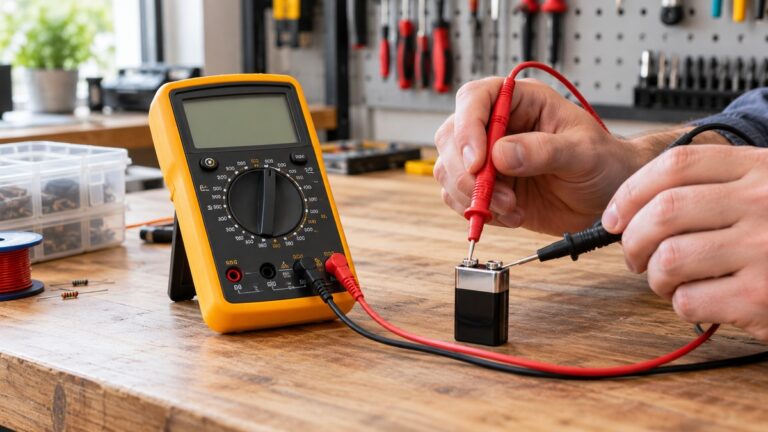
How to set a multimeter to ohms takes four moves: turn the circuit power off, turn the dial to the resistance position, plug the leads into the jacks the manual names, and read the display. Resistance readings belong on de-energized parts only. The display also shows OL in more than one situation, and the manuals describe that symbol in slightly different words. This guide follows the manuals and university pages we opened. Dial labels and button names vary between meters, so check your own manual before you start.
Quick answer
- Turn off power to the circuit, or take the part out of it, before you measure resistance.
- Plug the black lead into COM and the red lead into the jack the manual labels V or VΩ.
- Turn the dial to the resistance (ohms) position, which many meters share with continuity, capacitance or diode.
- With the leads open, OL on the display is expected. The Klein manual calls it normal.
Electrical safety comes first
Work on mains circuits can cause severe injury or death. The Klein MM400 manual says that failure to observe its warnings “can result in severe injury or death.” The Fluke safety guide says that working with electricity “always carries a risk.” This guide covers resistance readings on de-energized parts only, such as a component taken off a board, a cable, a switch, or a low-voltage battery circuit with the battery disconnected. It does not cover outlets, panels, service wiring or any live circuit.
Check the meter’s CAT rating before you measure anything. CAT is the overvoltage installation category. The Fluke guide advises choosing a meter “rated for the highest category” you could use it in, with a voltage rating that matches or exceeds the job. The Klein manual says never to use the meter on a circuit with voltages that exceed “the category based rating of this meter.” Its specification section reads “Safety Rating: CAT III 600V.” The Amprobe AM-510 manual gives Category III 600 Volts and says not to apply more than the rated voltage marked on the meter. Those figures belong to those two models. The sources we opened do not give a CAT rating for any other meter, so read the rating from your own meter’s manual or listing. For a plain explanation of how CAT and voltage ratings work together, see our 600V CAT III explainer.
Panel and service work belongs to a licensed electrician. OSHA’s general industry standard says safety-related work practices must be used to prevent “electric shock or other injuries” when work is done near or on equipment that is, or may be, energized. It also says live parts an employee may be exposed to must be de-energized before the employee works on or near them, with exceptions the employer has to demonstrate. The Amprobe manual says voltages above 30 Vac rms or 60 Vdc “pose electrical shock hazards.”
What you need before you start
- A digital multimeter with a resistance (ohms) position on its dial. Fluke says that position “often shares a spot on the dial” with continuity, capacitance or diode modes.
- Test leads in good condition. The Klein manual says not to use the meter or test leads if they appear to be damaged.
- The part to measure, isolated from its circuit where you can manage it. Fluke says the best results come from removing the part.
- Your meter’s manual, to confirm the jack labels.
Steps to set a multimeter to ohms
Step 1: Turn off the circuit power
Remove power from the circuit before you connect the leads. The Klein MM400 resistance procedure lists this as step 2, “Remove power from circuit.” Fluke’s first step is titled “Turn Off Power to Circuit.” The Amprobe manual says to disconnect circuit power before testing resistance. The RMIT electrotechnology module says the power source must be removed or isolated, or the meter will be damaged. Its measurement exercise also tells the reader to disconnect the battery from the circuit before measuring resistance. The University of Mississippi physics appendix notes that the power supply was disconnected in order to measure a circuit’s resistance.
Step 2: Plug the leads into the right jacks
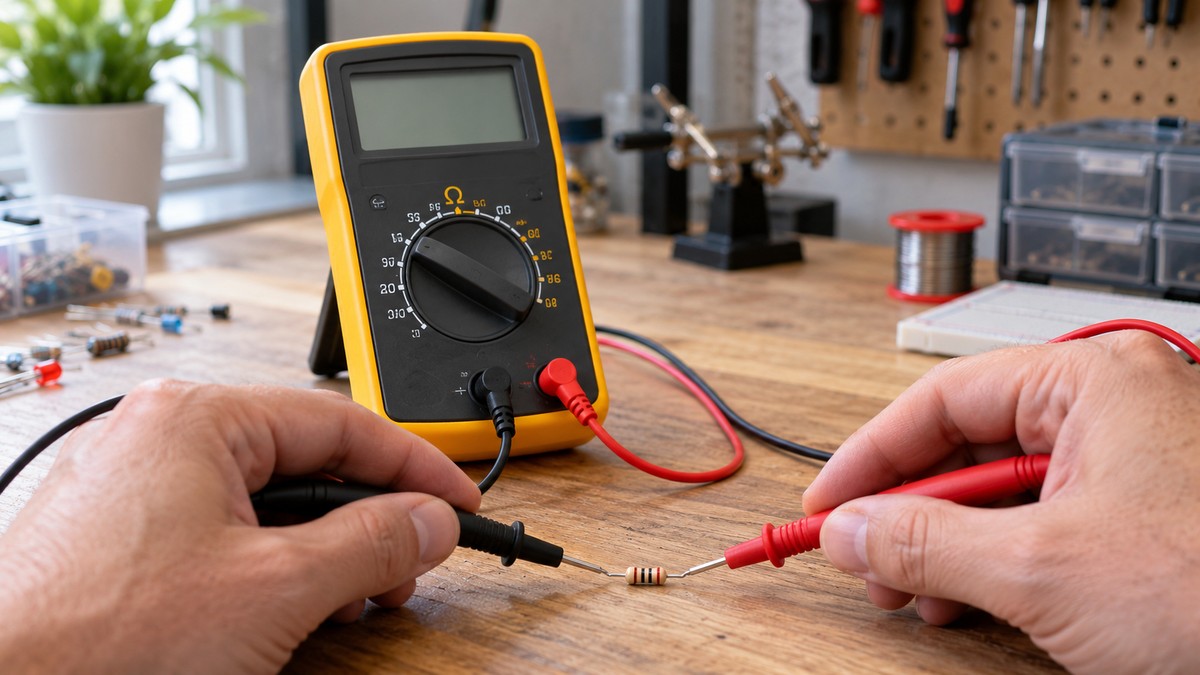
Put the black lead in the COM jack. Fluke’s instruction is “Insert the black test lead into the COM jack.” The Klein and Ole Miss procedures use the same common jack. Fluke then says to “insert the red lead into the VΩ jack.” The Klein manual uses the jack it labels V for resistance, and the Ole Miss appendix also puts the red lead in the jack it labels V for ohmmeter use. The Amprobe AM-510 manual lists its resistance input as terminal 7 and its mA or A input as terminal 9, so on that meter the resistance lead goes in terminal 7, not the current terminal. Check the labels on your own meter, because the sources we opened do not cover a dedicated resistance jack.
Step 3: Turn the dial to the resistance position
Turn the dial to the resistance or ohms position. Fluke’s instruction is “Turn digital multimeter dial to resistance, or ohms.” On the Klein MM400, the dial position is labeled Continuity/Resistance, and the meter starts in continuity testing. To reach resistance, press the SEL button once, and the manual says the resistance icon then appears on the display. The AM-510 rotary switch table lists “Resistance measurement” as its own position. For a separate guide to that test, see how to use a continuity tester.
Step 4: Choose auto-range or a fixed range
The meters in these manuals start in auto-ranging. The Klein manual says the meter “defaults to auto-ranging measurement mode.” Fluke says that with leads connected to a component, the meter “automatically uses the Autorange mode to adjust to the best range.” The AM-510 default is also “Auto ranging.” To hold a fixed range, press the RANGE button. Fluke’s instruction is “Press the RANGE button to select a specific fixed measurement range.” The Klein manual says to use the RANGE button “to manually force the meter to measure in a different range,” and to press and hold it for more than one second to return to auto. On the AM-510, pressing the RANGE button switches to manual ranging, and holding it for 2 seconds returns to auto ranging. Both manuals list six resistance ranges, from 400.0 Ω to 40.00 MΩ: 400.0 Ω, 4.000 kΩ, 40.00 kΩ, 400.0 kΩ, 4.000 MΩ and 40.00 MΩ. If you compare meters that pick their own range, see our auto-ranging meter picks.
Step 5: Zero the leads, if your meter has a relative mode
Touch the two probe tips together and read the display. Fluke says the relative mode “may also be referred to as zero or Delta (Δ) mode,” and that it “automatically subtracts test lead resistance.” Fluke puts that lead resistance at “typically 0.2 Ω to 0.5 Ω,” and says that if the leads touch, “the display should show 0 Ω.” On the AM-510, relative zero mode sits on the HOLD/REL key. Its manual gives the 400 range as the displayed value minus the probe’s short-circuit value. On the Klein meter, this step has no matching function in the manual we opened.
Step 6: Connect the leads across the part
With the power off, connect the leads across the part. Fluke’s instruction is “Connect test leads across the component being tested,” and it adds that contact between the leads and the part must be good. The Ole Miss appendix says to “Place leads on each end of the same element.” Fluke says the best results come when the part is out of the circuit, because other parts in parallel can change the reading. The Klein manual says to “keep fingers away from the metal probe contacts when making measurements,” and Fluke notes that “The human body becomes a parallel resistance path,” which lowers the total resistance the meter reads.
Step 7: Read the display and hold the reading
Read the number and its unit from the display. The Fluke guide says the display “should show OLΩ” when the leads are open, and that the MΩ symbol “may appear in the display” because open test leads have very high resistance. The Klein manual says the display “will indicate O.L.” with the leads open. The AM-510 manual notes that a higher resistance reading may take a few seconds to settle. To freeze a reading, press HOLD, which the Klein manual describes as a way “to hold the measurement on the display.” When you finish, turn the meter off. Fluke’s heading for this step is “Turn Multimeter OFF to Prevent Battery Drain.”
Reading the display: what OL means
The manuals and the Fluke knowledge base do not describe OL in identical words, so each wording is given below.
- The AM-510 manual says the OL symbol “is displayed on LCD when the measurement is out of range.” Its resistance section adds “Over range or open circuit indication: OL,” so one label covers two cases.
- The Klein manual’s specification section describes overload as OL “indicated on display.” Its resistance section says that with the leads open, or when a failed resistor is under test, the display “will indicate O.L. This is normal.”
- Fluke’s knowledge base says OL has “no specific meaning.” It describes OL as a symbol Fluke uses to show that the value is too large for the meter to measure.
Read side by side, the practical rules are narrow. With the leads open, OL is what the sources expect, so it is not a fault by itself. OL on a part is a different question. The Klein manual treats OL as normal when a failed resistor is under test, which means OL on a part can point to a failed resistor. The AM-510 label covers both an open circuit and a value outside the range.
Common mistakes
- Measuring with the power on. The Klein manual says “DO NOT attempt to measure resistance on a live circuit.” The RMIT module says the meter will be damaged unless the source is removed or isolated.
- Leaving the part in the circuit. Fluke says other components in parallel can change the reading.
- Staying in continuity. The Klein meter defaults to continuity testing in the Continuity/Resistance setting, so confirm the mode before you read a value.
- Holding the metal tips. Both the Klein manual and Fluke warn about body contact with the probes.
- Calling open-lead OL a fault. Klein calls it normal with the leads open, and Fluke says OLΩ should show.
- Forgetting lead resistance on small readings. Fluke puts lead resistance at typically 0.2 to 0.5 ohms, and the AM-510 manual subtracts the probe’s short-circuit value on the 400 range.
- Dirty or oily contacts. Fluke lists “Foreign substances (dirt, solder flux, oil)” as a factor that can change resistance readings.
How we chose
We started with manufacturer manuals and pages for the resistance steps: Fluke’s resistance guide, Fluke’s knowledge base article on OL, the Amprobe AM-510 manual on Fluke’s document host, and the Klein MM400 manual, opened as a copy on a university course page. For the power-off rule and the warnings we added two university pages (RMIT and the University of Mississippi physics appendix), Fluke’s safety guide and an OSHA standard. Each step is supported by at least two of these sources, and each quote was checked against the downloaded text. We did not use retailer listings or third-party explainers. Pages that returned 403, 404 or 405 were left out, including a University of Alberta lab handout (404) and a NIOSH toolbox PDF (403). All sources were opened on 2026-10-21.
What we could not verify
The sources we opened do not give a normal resistance value for any part, so this guide does not say what a good number is for a resistor, fuse, or wire. They do not tell you how to separate an open part from a reading above the selected range, because the AM-510 manual gives both causes under one OL label. The CAT and voltage figures quoted above come from the Klein MM400 and Amprobe AM-510 manuals only, and the sources do not give a CAT rating for other meters. The sources also do not cover meters with a dedicated resistance jack, or meters with a different dial layout.
Two of the sources we opened say to discharge capacitors before a resistance test. Fluke states this for a capacitor in the circuit, and Amprobe states it for high-voltage capacitors. We did not find a third source for that step, so this guide does not give it as a step. Read your meter’s manual on capacitors before any resistance reading.
Frequently asked questions
Do I have to turn the circuit off to measure ohms?
Yes. The manuals and pages that cover the procedure all put the power off first, including the Klein manual, the Amprobe manual, Fluke and the RMIT module. The sources we opened give no method for measuring resistance on a live circuit.
Which jack does the red lead use for ohms?
Use the jack the manual labels for resistance. The sources name it VΩ (Fluke), V (the Klein manual and the Ole Miss appendix) and terminal 7 (the AM-510 manual).
Why does my meter show OL when nothing is connected?
With the leads open, the sources expect OL. Fluke says the display should show OLΩ when nothing is connected, and the Klein manual calls the same indication normal. The AM-510 manual defines OL as an out-of-range or open-circuit indication, so an open lead fits that definition.
Should I set a range myself or leave it on auto?
The manuals start in auto-ranging. Fluke says a fixed range is picked with the RANGE button, and the AM-510 manual says a higher resistance measurement may take a few seconds to settle, so give a high reading a moment before you record it.
Do I need to zero the leads before every reading?
Only if your meter has a relative or zero mode, which Fluke and the AM-510 manual both describe. The Klein manual we opened has no such mode.
Can I check a part while it is still wired into a board?
The sources we opened give no method for that. Fluke says the best results come from removing the part, because other parts in parallel can change the reading. The Klein manual says not to measure resistance on a live circuit. If the part cannot be removed, the sources give no procedure for that case.
Sources
- Fluke, How to Measure Resistance with a Digital Multimeter: https://www.fluke.com/en-us/learn/blog/digital-multimeters/how-to-measure-resistance (opened 2026-10-21)
- Fluke knowledge base, What does OL mean on a Fluke meter display: https://my.fluke.com/en-us/article/KA-04122 (opened 2026-10-21)
- Amprobe AM-510 Users Manual, 2/2012 Rev.2: https://fluke.syncforce.com/efulfillment/13211-eng (opened 2026-10-21)
- Klein Tools MM400 user manual, UBC-hosted copy: https://www.eoas.ubc.ca/courses/atsc303/Instruments/manuals/0_Klein-Tools-MultiMeter-MM400-UsersManual.pdf (opened 2026-10-21)
- RMIT Learning Lab, Electrotech, Connection and measurement: https://learninglab.rmit.edu.au/Toolbox/electrotech/toolbox1204/units/03unit/08topic/text_alternative/ta_ch2.htm (opened 2026-10-21)
- University of Mississippi, PHYS222 lab manual appendix: https://www.phy.olemiss.edu/~thomas/weblab/222%20Lab%20Manual/PHYS222_APPENDIX.pdf (opened 2026-10-21)
- Fluke, Guide to digital multimeter safety: https://fluke.com/en-us/learn/blog/safety/multimeter-guide (opened 2026-10-21)
- OSHA, 29 CFR 1910.333 Selection and use of work practices: https://www.osha.gov/laws-regs/regulations/standardnumber/1910/1910.333 (opened 2026-10-21)