How to Test a Light Sensor With a Multimeter
As an Amazon Associate we earn from qualifying purchases.
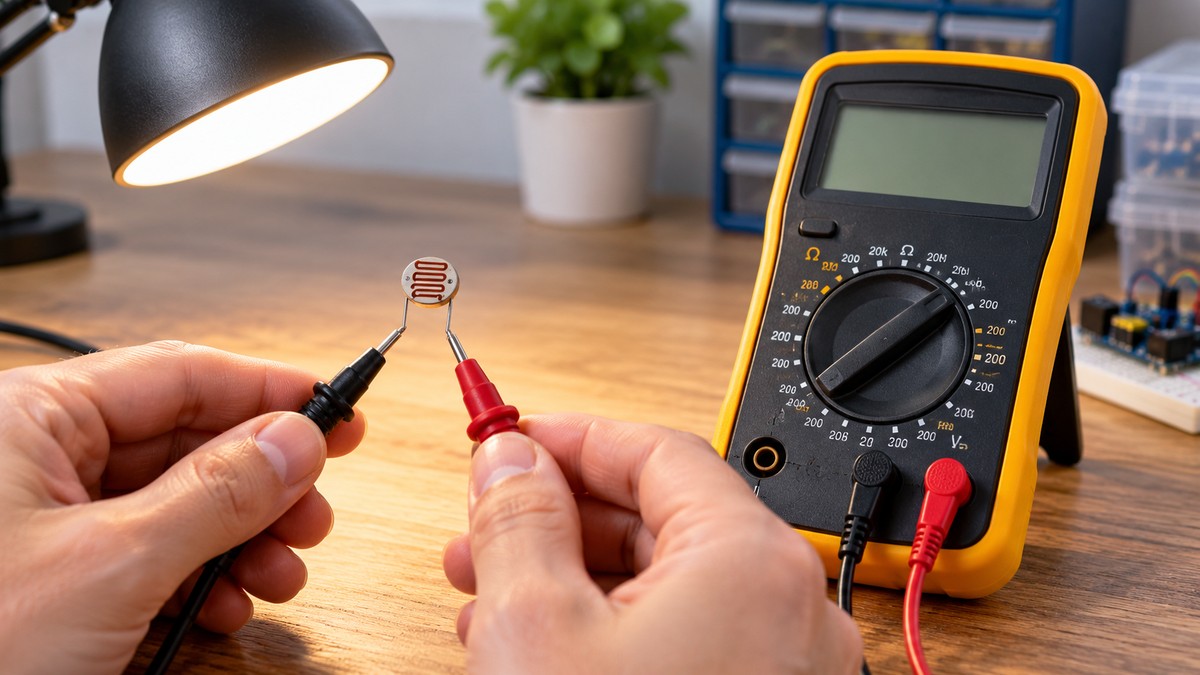
How to test a light sensor with a multimeter comes down to three bench readings: the supply voltage at the sensor’s supply pin, the output with the sensor covered, and the output with light reaching it. The check runs on a low-voltage supply, and the module stays disconnected from any controller. The datasheet for your exact part number sets the supply range and describes the output in light and in dark, so that datasheet decides what a correct reading looks like.
Electrical safety first
Contact with a live mains circuit can result in serious injury or death. The ECAO/IBEW trade advisory says as much, and MIT’s electrical safety page states that current, not voltage, is the killing factor in electrical shock. The federal rule at 29 CFR 1910.333, as published by Cornell’s Legal Information Institute, says that safety-related work practices shall be employed to prevent electric shock. This guide gives no step for mains wiring, panels, outlets or service equipment. Every step below uses a low-voltage supply that you set, with the sensor disconnected from any controller or wall-powered device.
Check the meter’s CAT rating against the circuit before you connect anything. Fluke’s guidance is to pick a meter whose category is the highest you might meet, with a voltage rating at or above that situation. The ECAO/IBEW advisory says to use only multimeters that display both a CSA logo, or an equivalent mark, and a CAT designation. Fluke’s myths article adds that the CAT rating on test leads should match or exceed the meter’s category. Read the rating from the listing or the manufacturer’s manual. If that document does not state a CAT rating, do not assume one.
Panel and service work is the job of a licensed electrician. MIT’s page limits work on building infrastructural electrical systems to licensed electricians. The federal rule says that only qualified persons may work on electric circuit parts that have not been deenergized. Fluke’s myths article adds that only electricians and technicians qualified to work on energized systems should perform the work when shutdown is infeasible.
Quick answer
- Set the supply inside the datasheet’s range, then read the supply pin with the meter on DC volts.
- Read the output in the dark and in light, and check the trend against the datasheet for that part number.
- For a current-output part, the voltage you read depends on the load resistor the datasheet names.
- Do not convert readings to lux from these sources, since they give no usable conversion.
What you need
- A digital multimeter with a DC volts setting. Fluke’s DC voltage article notes that some meters also include a dc millivolts setting, which a millivolt-level output needs.
- Test leads with a CAT rating that matches or exceeds the meter’s category, as Fluke’s myths article recommends.
- A bench DC supply or a battery, set inside the datasheet’s recommended supply range. Use a current limit if the supply has one. The limit is our own assumption, since the datasheets give supply current figures but no bench setting.
- The datasheet for your exact part number. Look for the pin table, the recommended operating conditions, the absolute maximum ratings and the output figures.
- For a current-output part, the load resistor that the datasheet names. The APDS-9008 rise-time test uses a 1 kΩ load, so that value comes from the datasheet and is not chosen by this guide.
- An opaque cover for the dark reading, and a light source you can aim at the sensor window. The sources we opened do not cover a lux meter, so this guide does not put a light level on any reading.
For the meter’s basics, see our guide to using a voltmeter. To compare meters with automatic range selection, see our roundup of auto-ranging digital multimeters.
Read the pin table first
Every reading depends on knowing which pin does what. The APDS-9008 table lists pin 1 as VCC, pin 4 as GND and pin 6 as Iout, and it marks pins 2, 3 and 5 as no connect. Its output is a current at pin 6, so a voltage appears only across a load resistor. The OPT101 table lists pin 1 as the power supply, VS, and pin 3 as -V, the most negative supply, which connects to ground or to a negative voltage within the recommended conditions. The output is pin 5.
Steps for the bench check
The steps below cite their sources inline. Work through them in order, and do not connect the sensor to a controller until every reading is recorded.
- Take the module off its controller and off any mains-powered equipment. The federal rule says live parts shall be deenergized before the employee works on or near them, so keep the supply off while you connect the meter.
- Find the pins in the datasheet. Match the supply, ground and output pins to the table for your part, as described above.
- Set the supply inside the recommended range. The APDS-9008 is rated for 1.6 V to 5.5 V, and the OPT101 for 2.7 V to 36 V. Do not exceed the absolute maximum, which is 6 V for the APDS-9008 and 36 V for the OPT101. Keep the supply off until the meter is connected.
- Set the meter to DC volts. Turn the dial to DC voltage, insert the black probe into the COM jack and the red probe into the V Ω jack. IHSA’s advisory says to make sure the leads are in the correct input jacks.
- Measure the supply pin. Connect the black lead to the circuit’s ground and the red lead to the supply pin. Fluke’s guide says to connect black to the negative test point, which is circuit ground, and red to the positive test point. Turn the supply on and read the voltage. Fluke says to refer to the manufacturer’s specifications for specific values in the circuit, so compare the reading with the recommended range. If it is outside the range, turn the supply off and correct the setting.
- Read the dark output. Cover the sensor window fully. The OPT101 datasheet describes a test chamber designed to keep out ambient light. For the OPT101, measure pin 5 relative to pin 3, the -V pin. The datasheet says the output is 7.5 mV dc with no light, so a small positive reading is the stated behavior. Use the millivolt setting if your meter has one. For the APDS-9008, connect the load resistor from pin 6 to ground, then measure the voltage across that resistor. The datasheet says the load resistor selects the current-to-voltage conversion.
- Read the light output. Aim the light at the sensor window. The OPT101 datasheet says the photodiode area is easy to find because it looks very dark next to the surrounding circuitry, and that a narrowly focused light must be aimed onto the photodiode. Record the reading. Both datasheets state that output rises with light: the OPT101 output “increases with increasing illumination,” and the APDS-9008 output voltage rises as the light brightens or as the load resistor grows.
- Write down the conditions. Record the supply voltage, the load resistor, the light source, its distance from the sensor and the meter’s range. Datasheet figures belong to stated conditions. For example, the APDS-9008 photo current figure is given at 1.8 V and 100 lux, so a reading without its conditions cannot be set against that figure.
- Compare with the datasheet. Check the trend, and then any figure stated for the same part number. The OPT101 gives 7.5 mV with no light. The APDS-9008 gives a dark current of 300 nA at 1.8 V and 0 lux, which is a current and not a voltage.
Reading the results
The trend is the most useful result from this check. A reading that rises as the light increases matches what both datasheets describe. The sources we opened give no threshold that separates a good sensor from a bad one, so do not treat a single number as a pass or fail unless the datasheet states a value for that condition.
For the OPT101, the dark figure is a pedestal of about 7.5 mV with no light. The datasheet also says the dark output voltage is trimmed to zero with an optional circuit. A dark reading near zero therefore does not match the untrimmed figure. The sources we opened do not say how to tell whether a given board uses that trim, so record the board details with the reading.
For the APDS-9008, the datasheet gives dark current, not dark voltage. Our own arithmetic, assuming the 1 kΩ load used in the datasheet’s rise-time test and the 300 nA dark current, gives 0.3 mV across that load. The datasheet does not state that voltage, so treat the figure as our own assumption and not as a datasheet value.
The APDS-9008 datasheet plots output voltage against lux for several load resistors. The copy we opened gives that chart as a figure, and its text does not list plotted values. This guide therefore gives no lux conversion, and no reading should be turned into a lux figure from these sources.
Common mistakes
- Testing with the module still on its controller. The federal rule requires live parts to be deenergized before work on or near them, so take the module off the controller and switch its supply off before you start.
- Using the wrong jacks. Fluke calls inserting probes into the wrong jacks a common technician mistake to avoid.
- Measuring the OPT101 output against the wrong reference. The OPT101 output is read against the -V pin, which the datasheet says connects to ground or to a negative voltage within the recommended conditions.
- Reading the APDS-9008 output without a load resistor. The datasheet says the load resistor determines the current-to-voltage conversion, so the voltage you read depends on the resistor you choose.
- Using the millivolt range without checking the input resistance. Fluke’s support article lists 1 MΩ input resistance on the mV range for some models and 10 MΩ on other DC ranges. Check your meter’s figure before you read a millivolt output.
- Exceeding the absolute maximum supply. The APDS-9008 absolute maximum is 6 V, and the OPT101 absolute maximum is 36 V.
- Using figures from another part. The numbers in this guide belong to the two parts named. A different part can differ, so take the figures from the datasheet for your part number.
How we chose
We limited the examples to manufacturer datasheets and to sensors whose output a multimeter can read, either as a voltage or as a current that a named load resistor turns into a voltage. The criteria were a supply pin, a stated supply range, a pin table, and a stated output behavior in light and in dark. The two datasheets we opened that meet them are the Texas Instruments OPT101 datasheet, revision SBBS002B, revised June 2015, and the Broadcom APDS-9008 datasheet, AV02-1169EN, dated November 7, 2008. For the meter steps, the sources are Fluke’s DC voltage article and Fluke’s input impedance support article. Each safety statement rests on three opened sources: IHSA’s advisory, MIT’s electrical safety page and Cornell’s copy of the federal rule, with Fluke’s guides added where they make the same point.
We opened a Vishay TEMT6000X01 datasheet and did not use it, because it describes a bare NPN phototransistor and not a module with a supply pin. Search results for a TAOS and ams TSL250R datasheet pointed only to third-party mirror sites, so we did not open one and do not cite one. We also opened a retailer’s CAT explainer and did not use it, because retailer pages are not used for safety claims.
What we could not verify
The sources we opened do not say the following, so this guide does not claim them.
- Both datasheets describe integrated circuits, not finished modules. The sources we opened do not cover module boards, and extra parts on a breakout board can change the readings.
- The sources we opened give no multimeter reading for either part at a stated light level.
- The APDS-9008 output-versus-lux chart appears as a figure, and the text of the copy we opened gives no plotted values.
- The sources do not say how long to wait after covering or uncovering the sensor before reading. The APDS-9008 rise-time figure is a test specification, not a wait time for a meter.
- The sources do not say how to produce a known light level at home, or which light meter to use for it.
- This guide’s method covers analog outputs only. The sources we opened give no multimeter method for digital sensors, whose output is data and not a voltage.
- The APDS-9008 copy is dated 2008, and the sources we opened do not show whether a newer manufacturer revision changes its figures.
- This guide names no meter, so it cannot give a CAT rating. Read the rating from the listing or manual of the meter you own, and if that document states none, do not assume one.
Frequently asked questions
Can a multimeter test any light sensor?
Not in every case. The method here reads sensors with an analog output, either a voltage or a current that a load resistor turns into a voltage. Digital sensors send data, and the sources we opened give no multimeter method for them.
Which supply voltage should I use?
Use a value inside the range printed in the datasheet for your part. For the two parts in this guide, that range is 1.6 V to 5.5 V for the APDS-9008 and 2.7 V to 36 V for the OPT101. Stay below the absolute maximum, which is 6 V for the APDS-9008 and 36 V for the OPT101.
Why does my output read in millivolts?
The OPT101 datasheet gives its output as about 7.5 mV with no light, which is a millivolt-level signal. Fluke’s DC voltage article notes that some meters have a dc millivolts setting, so use that setting if your meter has one.
Do I need a lux meter?
The sources we opened do not cover a lux meter or a known light level for home use. Without a lux figure, compare the readings with the trend the datasheet describes, and do not convert them to lux.
Is this check safe for mains-powered equipment?
No. This guide stays with low-voltage bench work. The MIT page says that even contact with standard 110-volt circuits can be lethal under certain conditions, so mains equipment is outside this guide.
Which figure should I trust if two datasheets disagree?
Use the datasheet for the part you are holding, and do not mix figures between parts. The part number on your board decides which datasheet applies.
Bottom line
Check the supply pin against the datasheet range, then compare the dark and light output with the behavior that the same part’s datasheet states.
Sources
- Texas Instruments, OPT101 Monolithic Photodiode and Single-Supply Transimpedance Amplifier, SBBS002B (revised June 2015): https://www.ti.com/lit/ds/symlink/opt101.pdf (opened 2026-10-22)
- Broadcom, APDS-9008 Miniature Surface-Mount Ambient Light Photo Sensor Data Sheet, AV02-1169EN (November 7, 2008): https://docs.broadcom.com/doc/AV02-1169EN (opened 2026-10-22)
- Fluke, How to Measure DC Voltage with a Digital Multimeter: https://www.fluke.com/en-us/learn/blog/digital-multimeters/how-to-measure-dc-voltage-with-a-digital-multimeter (opened 2026-10-22)
- Fluke, Input Impedance of Multimeters, Clamp Meters and Electrical Testers, support article KA-04308: https://my.fluke.com/en-US/article/KA-04308 (opened 2026-10-22)
- Fluke, Guide to Digital Multimeter Safety: https://www.fluke.com/en-us/learn/blog/safety/multimeter-guide (opened 2026-10-22)
- Fluke, 4 Myths About Electrical Safety That May Surprise You: https://www.fluke.com/en/learn/blog/safety/electrical-safety-myths (opened 2026-10-22)
- ECAO/IBEW Trade Safety Advisory on multimeters, IHSA (Ontario, Canada): https://www.ihsa.ca/pdfs/safety_bulletins/safety_bulletin_multimeters.pdf (opened 2026-10-22)
- MIT Environmental Health and Safety, Electrical Safety: https://ehs.mit.edu/electrical-safety (opened 2026-10-22)
- Cornell Legal Information Institute, 29 CFR 1910.333, Selection and use of work practices: https://www.law.cornell.edu/cfr/text/29/1910.333 (opened 2026-10-22)