Why a High Impedance Test Light Can Glow on a Dead Wire
As an Amazon Associate we earn from qualifying purchases. Details
Updated 19 October 2026
Author: Editorial team, bestmultimeter2020.com
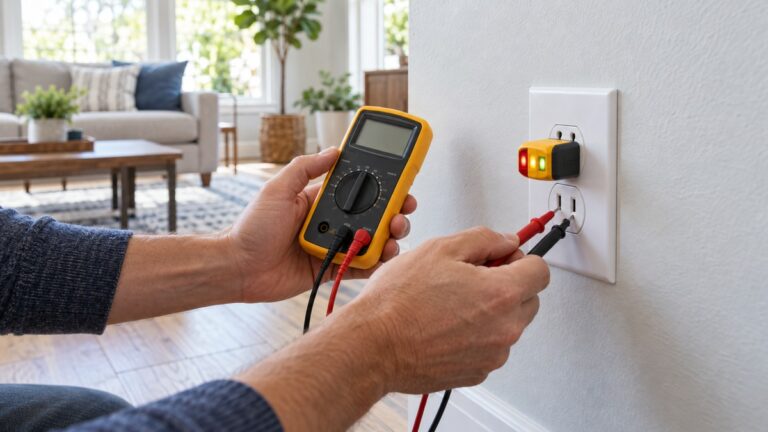
A high impedance test light is a tester whose input draws very little current from the circuit. That makes it sensitive, and it also means it can glow or show a reading on a conductor that has no real source, because of stray or ghost voltage. The sources we opened describe this effect on digital multimeters and explain the impedance cause in detail. They do not describe test lights as a product, so the sections below apply the same impedance principle to a test light and say clearly where that step is an inference.
Quick answer
- A high impedance input draws very little current. A dead-looking wire that runs close to an energized one can pick up stray voltage, and a high-impedance input cannot drain it, so the tool shows a reading.
- A low-impedance setting or tester presents a much lower input impedance. The Fluke guide describes a low-impedance position of about three kilohms, against more than one megohm for high-impedance inputs.
- A glow on a wire is a reason to stop and check again. It is not proof of a live circuit, and a lack of glow is not proof that the circuit is dead. Confirm with a voltage tester and a known source.
What impedance means for a tester
Input impedance is the opposition the instrument presents to the circuit it measures. A high input impedance draws little current, and a low input impedance draws much more. The Fluke dual impedance article lays out the typical values. Most digital multimeters sold for electrical and electronic work have high impedance input circuits, and the article puts that at greater than 1 megohm. Older troubleshooting tools, including analog multimeters and solenoid testers, have low-impedance inputs of about 10 kilohms or less.
The distinction matters because the current a tool draws decides whether a small induced voltage shows up as a reading. A tool with a large input impedance draws very little current, so even a small voltage on the wire can show on the display. A tool with a low input impedance draws more current from the same wire, so the stray voltage is drained away and the reading falls.
The same article describes the low-impedance function on some Fluke meters, called Auto-V/LoZ. It says that this function “presents a low impedance input to the circuit under test”, and it recommends the low-impedance switch position for most troubleshooting and for sensitive electronic loads. On the Fluke 114, 116 and 117 DMMs, the regular Vac and Vdc positions are the high-impedance ones.
Why a dead-looking wire can read as live
The Fluke product page for its stray voltage adapter explains the cause in plain terms. “This is called stray or ghost voltages and is caused by the capacity between wires.” The capacitance between a dead conductor and a live one nearby can couple a small voltage onto the dead conductor. The page then explains why the display shows it: “Because of the very high impedance input of the meter, this stray voltage has nowhere to go which will lead to an incorrect reading on the meter.”
The Fluke product page does not give a list of cable types, routes or distances, so this post does not give one. What the page does establish is the mechanism: capacitance couples the voltage, and a high-impedance input cannot drain it. A glow or a reading on a supposedly dead wire is the expected symptom of that mechanism, so it should be treated as a warning.
The Fluke product page also gives the fix. “The solution is to make sure there is a lower impedance across the input terminals of the meter.” The adapter it describes is a lower-impedance path, and the Fluke dual impedance article describes the same idea as a switch position on the meter. Either way, the aim is the same: add a load that drains the stray voltage so the reading reflects what is really on the wire.
Input impedance figures in the sources
The table gathers every impedance figure the opened sources give, with the tool each one applies to. Where a source gives no figure for a tool, the table says so.
| Tool or setting | Input impedance in the sources | Where the figure comes from |
|---|---|---|
| Most digital multimeters for electrical and electronic work | Greater than 1 megohm | Fluke dual impedance article |
| Analog multimeters and solenoid testers | About 10 kilohms or less | Fluke dual impedance article |
| Fluke low-impedance function, Auto-V/LoZ | About 3 kilohms, on the order of three kilohms | Fluke dual impedance article |
| Test light of any type | No figure given | The sources we opened do not cover test lights |
| Stray voltage adapter (TL225) | A lower impedance across the meter input, no figure given | Fluke TL225 product page |
The table makes one point clear. The sources give figures only for meters and for the low-impedance function, so the test light row stays blank. A test light’s impedance must come from its own datasheet, and the post does not guess at it.
The numbers behind the glow
The impedance figures from the sources let you compare the two inputs directly. Take the ratio of the high-impedance input to the low-impedance input:
Ratio = high impedance divided by low impedance.
A high-impedance input of 1 megohm (1,000,000 ohms) against a low-impedance input of 10 kilohms (10,000 ohms) gives 1,000,000 divided by 10,000 = 100. The high-impedance input presents about 100 times more impedance. Against the about 3 kilohm low-impedance function that the Fluke dual impedance article describes, the same 1 megohm figure gives 1,000,000 divided by 3,000 = 333.3, or about 333 times.
Current follows from voltage and impedance. Take 120 V on the wire, which is an example figure and not a reading from any source. Across 1 megohm the current is 120 V divided by 1,000,000 ohms = 0.00012 A, which is 0.12 mA. Across about 3 kilohms the current is 120 V divided by 3,000 ohms = 0.04 A, which is 40 mA. The low-impedance load draws about 333 times the current, and that current is what drains a stray voltage away.
These are our calculations from the stated impedance figures and an example voltage. They are not measurements of any tester, and the sources do not give the impedance of a particular test light.
What the sources do not say about test lights
The sources we opened describe digital multimeters, a stray voltage adapter and general impedance categories. They do not describe a high impedance test light, its input circuit, its brightness at a given voltage, or the threshold at which it glows. Any statement about a specific test light has to come from that tool’s own specification, not from this guide.
What carries over is the principle. A test light with a high input impedance draws little current, and a glow from a wire that should be dead is the same kind of warning a high-impedance meter reading gives. The Fluke dual impedance article makes the point for meters, and we apply it to test lights as an inference. Check the tool’s manual for its input impedance before you rely on the result.
What to do when a tester shows voltage on a dead wire
Stop and treat the wire as live until you have proved otherwise. Do not decide the circuit is safe because the tester is quiet, and do not decide it is live because the tester glows. Either result needs a second check.
The second check is the voltage tester. The Fluke absence-of-voltage guide says equipment can still have voltage after it appears to be shut down. “Even when equipment appears to be shut down, voltage can still be present.” A voltage tester confirms the state, and the Live-Dead-Live sequence checks the tester on a known source before and after the target check. The Fluke multimeter safety guide also says to use a known voltage source or a proving unit to confirm the meter is working, and not to assume it is.
If the reading persists, use the lower-impedance setting on a meter if one is available, or stop and call a licensed electrician. Panels, service equipment and any circuit you cannot isolate are outside this guide, and a licensed electrician should do or direct that work.
Safety notes
Work on a circuit only after you have isolated it and confirmed its state with a voltage tester. The steps above describe a check, not a method for working on a live circuit. Do not open a panel or service equipment, and do not try to clear a stray voltage by cutting, bridging or grounding conductors. Those actions are for a licensed electrician.
Check the CAT rating of the tester and the meter before use, because the rating limits the environment in which the tool may be used. The Fluke clamp meter article says the CAT rating is usually displayed near the input jacks, and the probes should carry an equal or greater rating. Replace a damaged lead before the check, because a damaged lead can change the reading.
For the basic use of a voltage tester, see how to use a voltage tester. For how a voltage tester is built and how it indicates voltage, see how do voltage testers work.
How we chose
We used the Fluke dual impedance article for the impedance figures and the low-impedance function, the Fluke product page for the ghost voltage cause and the fix, and the Fluke absence-of-voltage guide for the shutdown warning. The Fluke digital multimeter article supplies the high input impedance statement for multimeters. We did not use Wikipedia, retailer pages, forum threads or blogs for any safety statement. The guide lists no products and gives no prices.
What we could not verify
- The sources we opened do not describe high impedance test lights. The application of the impedance principle to a test light in this post is an inference, and the tool’s own specification should confirm it.
- The sources do not give the input impedance, glow threshold or brightness of any test light.
- The sources do not list the cable types, distances or installation details that produce ghost voltage.
- The sources do not describe how a particular tester behaves on a circuit with a real source of voltage at the same time.
FAQ
What is a high impedance test light?
It is a tester whose input draws very little current from the circuit, so it is sensitive to small voltages. The sources describe the principle for digital multimeters, and the same principle applies to a test light as an inference. Check the tool’s specification for its input impedance.
Why does my test light glow on a wire that should be dead?
The likely cause is ghost or stray voltage. Capacitance between nearby wires can couple a small voltage onto a dead conductor, and a high-impedance input cannot drain it, so it shows as a glow or a reading. The Fluke product page describes this mechanism directly.
Is a low-impedance tester always better?
No. A low-impedance tester draws more current and can drain stray voltage, which helps on suspect readings. The Fluke dual impedance article says low-impedance tools should only be used on power circuits, or on circuits where the load will not change the circuit’s behavior. Sensitive electronic circuits need the high-impedance setting for some work.
Does a glow mean the circuit is live?
Not on its own. A glow is a warning that the circuit needs a second check. Confirm the state with a voltage tester and a known source, and do not work on a circuit until it is confirmed safe.
Does a dark test light prove the circuit is dead?
No. The sources we opened say a voltage tester must confirm that equipment is dead. A tester that does not show anything still needs to be checked on a known source, because the tester can fail or be used wrongly.
Bottom line
A high impedance test light can glow on a dead wire because stray voltage has little current path to drain through. Treat any glow as a reason to stop, confirm the state with a voltage tester and a known source, and call a licensed electrician for panels, service equipment or any circuit you cannot isolate.
Sources
- Fluke learn: Dual impedance digital multimeters: the high and low impedance figures, the low-impedance function and the recommended switch positions
- Fluke TL225 stray voltage adapter product page: the ghost voltage cause, the high-impedance explanation and the lower-impedance fix
- Fluke learn: What is a digital multimeter?: the high input impedance of digital multimeters
- Fluke learn: About absence of voltage testing: the shutdown warning and the live-dead-live sequence
- Fluke learn: Guide to digital multimeter safety: the known source check and the advice not to assume a meter works