PCB Board Testing
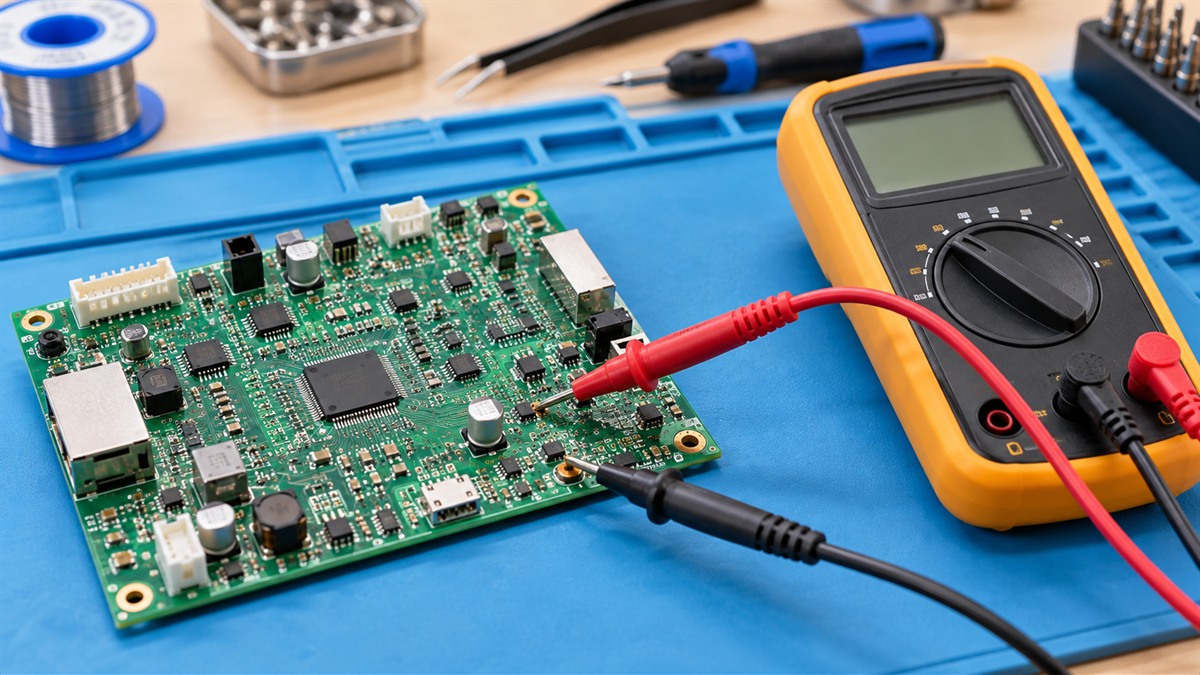
PCB board testing means checking a printed circuit board for open traces, shorts, bad solder joints, and parts installed the wrong way round. The order of the checks matters. Start with the board unpowered and check continuity and resistance between the points you expect to be connected. Only after that should you power the board and check voltages on the supply and ground points. This guide walks through that order, names the meter setting for each step, and includes a worked example with made-up readings. It is a guide rather than a roundup, because the basic method needs no particular product.
Quick answer
Power the board off first. Use a multimeter in resistance mode, with the audible setting if your meter has one, to check traces and solder joints. Check LED orientation with the meter. Then apply power and measure DC voltage on the supply and ground points, with the ground lead connected to the board ground. This guide uses one opened lab procedure as its source. It does not name a product, because the Amazon search for the exact phrase returned mostly blank prototype boards rather than testing tools.
What you are looking for
A PCB fault usually falls into one of three groups. An open is a trace or joint that should conduct but does not. A short is an unintended path between two points that should be separate. A part fault is a component that is installed backwards or has failed. The method below reads the board in a fixed order, so you do not change its state while you test it.
Step 1: power the board off and check continuity
The lab procedure says continuity checks of traces and solder joints happen while the board is not connected to power. Disconnect the board from its supply, then check the connections you need. The same source uses the meter’s audible setting in resistance mode, so a closed path gives a beep and an open path does not.
Start with the connections you expect. Put one probe on a supply pin and move the other along the trace to the component it should reach. A beep means that path is closed. No beep means the trace or joint is open between the two points, or the probe is not making contact.
Step 2: check for a short between supply and ground
A short between the supply and ground is one of the faults to rule out before you apply power. With the board still off, set the meter to resistance and measure between the supply pin and the ground pin. In resistance mode, a near-zero reading means the two points are joined by a low-resistance path. Find out whether that path is intended, using the schematic. The lab procedure does not give a resistance threshold, so compare the reading with what your board documentation expects.
Step 3: check component orientation
Parts installed backwards can work incorrectly or not at all. The lab procedure says to use the meter to check the correct orientation of LEDs. Compare the LED’s polarity with the board’s markings or schematic before you apply power.
Step 4: apply power and check voltages
When the continuity checks pass, connect the board to its power supply. The lab procedure describes connecting the board to a supply through its FTDI header. Set the multimeter to DC voltage mode on the correct scale, for example a 20V DC range for a 12V input. Connect the ground lead to the board ground, using a 12 inch clip lead if the board has no convenient ground point. Then measure the supply rails and the points you expect to be at that voltage. The lab procedure does not give a current limit. Check your board’s documentation for its supply limit; a 1 amp limit appears in the example below only as an illustration. A board with a 24V input needs the same checks at its own setting.
Worked example: a board that reads a short
This example uses made-up readings to show how the steps connect. Suppose a board has a 12V input, a 5V rail and a 3.3V rail, as its schematic shows. With the board off, the 12V input pin and ground read 0.5 ohms in resistance mode. Step 2 says a near-zero reading needs an explanation before power-up. You move one probe along the trace and keep the reading at 0.5 ohms until you reach a capacitor on the 3.3V rail. At the capacitor, one lead reads 0.5 ohms to the trace and the other reads open, so the capacitor is the likely cause. Lift one lead, read the input pin to ground again, and compare the result with the schematic. If the reading now opens, the capacitor was the likely cause. If it still reads 0.5 ohms, check the next component on the path.
Only after the short is cleared do you power the board. In this example only, the bench supply is set to 12V with a 2 amp limit, which is an illustration and not a figure from the lab source. Then check the 5V and 3.3V rails on a 20V DC range and compare each reading with the schematic.
Mistakes to avoid
- Running continuity checks on a powered board. The lab procedure says continuity checks happen while the board is unpowered.
- Treating a beep as proof the path is correct. A beep shows a closed path. It does not show that the path is the one the schematic expects.
- Skipping the orientation check on LEDs and other polarised parts.
- Changing a reading’s meaning without checking it against the schematic.
Limits of this guide
This guide uses one opened source for the procedure: a Harvard and MIT lab page on test equipment and circuit boards. It does not cover every board type, it does not give resistance thresholds, and it does not cover mains-powered equipment. Use the documentation for your own board, and its safety instructions, before you apply power.
FAQ
Should I test a PCB with the power on or off?
Start with the power off. The lab procedure says to check continuity of traces and solder joints with the board not connected to power. Power the board only after those checks pass.
Which meter mode should I use?
Use resistance mode, with the audible setting if your meter has one. The lab procedure describes using the audible setting in resistance mode for continuity checks.
How do I check LED orientation?
Use the meter to check the LED’s polarity, and compare it with the board’s markings or schematic. The lab procedure says to check LED orientation with the meter.
Where do I connect the ground lead?
Connect the ground lead to the board ground. The lab procedure suggests a clip lead for this connection.
Related guides
For a tool built for board checks, see Best PCB Tester. For the continuity method in more detail, read How Do I Use a Continuity Tester. For a broader list of continuity tools, see Best Continuity Tester.
Sources
- Harvard and MIT lab page, test equipment and circuit board checks (fab.cba.mit.edu): used for the unpowered continuity check, the audible resistance setting, LED orientation check, and DC voltage check with a ground lead.