How to Test a Thermocouple With a Multimeter: Six Meters Compared by K-Type Input
As an Amazon Associate we earn from qualifying purchases. Details
How to test thermocouple with a multimeter comes down to one bench check: set a digital multimeter to DC millivolts, connect its leads to the thermocouple wires, bring the sensing tip to a known temperature, and compare the millivolt reading with a Type K reference chart. This guide explains that method, the safety ratings to match before you connect anything, and six multimeters whose listings state temperature or K-type input. Two of the six name a K-type probe. The other four say only that they measure temperature.
Quick answer
- Use the millivolt check. Set DC millivolts, connect the leads, hold the tip at a known temperature, and compare the reading with a Type K table. The reference value for 100 °C is 4.096 mV.
- Two listings name a K-type probe. The Elitech CM-110AC says its K-type probe is included. The DIGCREAT XDM1041-DG says its K-type probe is not included.
- Four listings say they measure temperature but name no probe type and give no DC millivolt range. Confirm both in the manual before you use one for thermocouple work.
- Match the meter’s CAT rating to the place you measure, and check the rating on the test leads as well.
The millivolt check, step by step
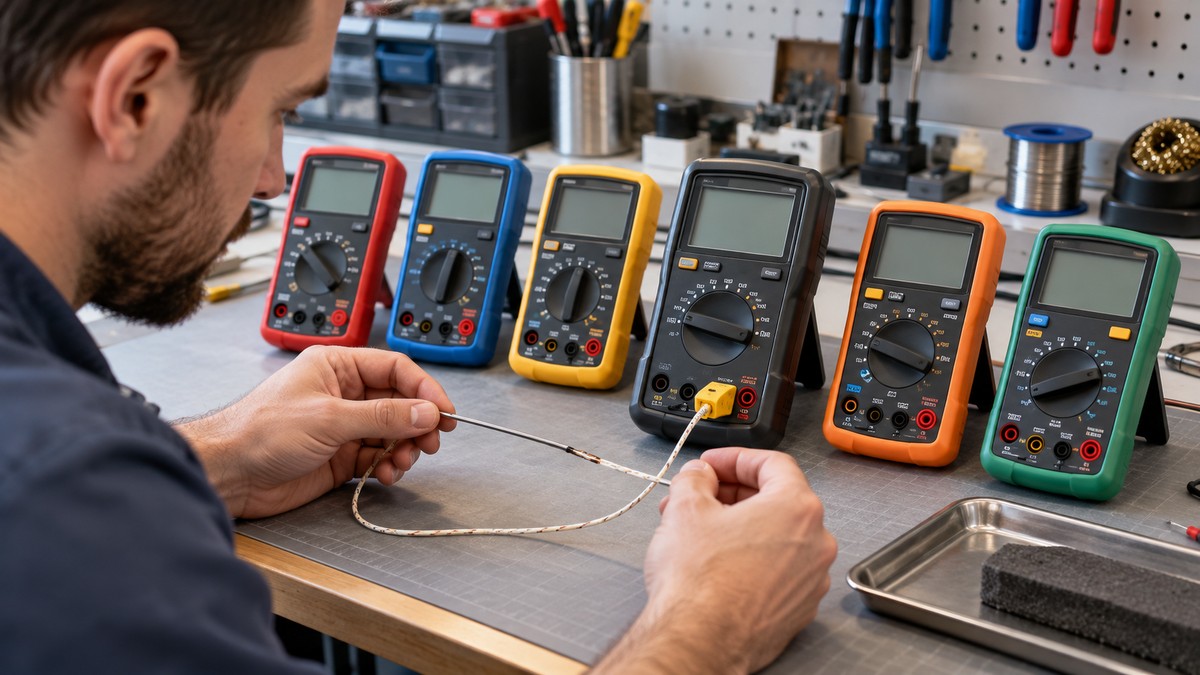
The method we could verify is the one BCST Group describes for a K-type thermocouple. It uses a digital multimeter on its DC millivolt setting. A Type K reference chart converts temperature into millivolts, so the millivolt range is the one that matters for the comparison. BCST also notes that a faulty thermocouple gives bad process data, which can lead to costly downtime or serious safety issues, so the check is worth doing before you trust a reading.
Work through the check in this order:
- Set the meter to DC millivolts. Find the millivolt range in the manual, because none of the six listings in this guide states one in its bullets.
- Connect the meter’s probes to the thermocouple leads. BCST describes connecting to the thermocouple leads, which is a different step from connecting to the equipment the thermocouple measures.
- Bring the sensing tip to a known temperature. BCST lists a way to create a stable, known temperature among the things you need, so plan a reference source before you start.
- Compare the millivolt reading with a standard Type K reference chart at that temperature. BCST’s example uses 100 °C, where the chart value is 4.096 mV.
The cold junction is the other half of the reading. BCST says the ambient temperature at the cold junction must be measured, because the meter reads the difference between the hot end and the cold junction. Its worked example pairs a 100 °C hot end, which reads 4.096 mV, with a 25 °C cold junction, which reads 1.000 mV. The practical point is that the chart value you compare against depends on the temperature at the connection point, not only on the temperature you hold at the tip.
BCST also says precision matters most in industrial settings, where a few degrees can make a large difference, and it asks for a digital meter with good accuracy. Only one listing in this set gives an accuracy figure. The DIGCREAT bullets give DC voltage accuracy of up to 0.05 percent. That figure names DC voltage, not a millivolt range, so it does not settle the question for the BCST method.
Two limits apply to this method. First, the sources we opened give one Type K value, 4.096 mV at 100 °C. They do not give a full table, so use a published Type K table for other temperatures and do not treat a single point as a calibration. Second, the sources do not describe a resistance or continuity check for a thermocouple, so this guide does not include one.
Read the CAT rating before you connect
A thermocouple check looks like low-voltage work, but the equipment a thermocouple is fitted to may be connected to mains supply. A furnace, oven, boiler or electrical panel can expose a meter to hazards that the millivolt reading does not show, so the meter’s safety rating matters as much as its temperature function.
The measurement category (CAT) system sorts the places you measure into four groups. Electronics Reference, one of the pages we opened, describes CAT I as circuits that are not connected to mains at all, CAT II as circuits fed from a household wall outlet, such as portable tools and appliances, CAT III as building wiring, distribution boards, circuit breakers and junction boxes, and CAT IV as the source of the low-voltage installation and outside cable runs.
Tester.co.uk, the second page, explains how the voltage number works with the category. Within one category, a higher voltage rating gives more protection, so a CAT III 1000 V meter offers better protection than a CAT III 600 V meter. Ratings are comparable only within the same category. A CAT II 1000 V tester gives more protection than a CAT II 600 V tester, but less than a CAT III 600 V tester.
Those two sources lead to three practical rules. Never use a meter for a measurement category higher than its rating. A higher category rating does not make a meter safe at every lower category and every voltage. And check the leads, because each lead carries its own category rating and the weakest part sets the limit for the whole setup.
What we could not verify here: the sources do not say whether a thermocouple’s own millivolt circuit has a CAT category, and none of the six listings states a CAT rating for its probe.
What each listing states about thermocouple input
The table uses only the wording in each listing’s bullets and specification sheet. Where a bullet names a probe, the table says so. Where it does not, the cell says not named.
| Listing | Temperature wording in the bullets | K-type probe named | Probe included, per bullets | Range given in bullets |
|---|---|---|---|---|
| Elitech CM-110AC clamp meter | Temperature, from -200 °C to 1200 °C | Yes, K-type thermocouple | Yes | -200 °C to 1200 °C |
| DIGCREAT XDM1041-DG desktop meter | Temperature, with a K-type probe | Yes, K-type temperature probe | No, listed as not included | Not stated |
| AstroAI AST-6000-D | Temperature among the measurements | Not named | Not stated | Not stated |
| Westinghouse 600V multimeter | Temperature in °C and °F | Not named | Not stated | Not stated |
| Westinghouse 1000V clamp meter | Temperature among the multi-function features | Not named | Not stated | Not stated |
| FNIRSI DMC-100 clamp meter | Temperature alongside AC and DC current | Not named | Not stated | Not stated |
Two points need care. First, the Elitech bullets are the only ones in this set that give a measurement range, and its specification sheet matches that range. Second, several specification sheets show an “Upper Temperature Rating”: 50 °C for the Westinghouse 600V meter, 122 °F for the AstroAI meter and 1300 °C for the FNIRSI meter. These figures appear to describe the meter’s operating conditions rather than what it measures. The bullets do not confirm either reading, so do not treat them as a measuring range.
How the listings differ in use
The probe-included meter. If you want one purchase that covers the K-type probe, the Elitech clamp meter is the only listing here that says so. Its bullets also say the clamp measures AC current without interrupting the circuit, which is a separate job from the millivolt check. Confirm the millivolt setting in its manual before you rely on it for the BCST method.
The probe-optional meter. The DIGCREAT desktop meter names a K-type temperature probe and says the probe is not included, so plan for one. Its bullets also describe recording measured data to internal memory and reading it on a computer, which suits a bench check where you want a written log.
The temperature-only meters. The AstroAI meter, the two Westinghouse meters and the FNIRSI clamp list temperature among their functions, and none names a probe type. These meters can still serve a general electrical job, but they do not give the thermocouple information this keyword needs unless the manual confirms the input.
The clamp and bench split. Three of the six are clamp meters: the Elitech, the Westinghouse 1000V clamp and the FNIRSI DMC-100. The other three are bench-style meters. The Westinghouse 600V specification sheet lists a 10 A maximum for direct and for alternating current, so it suits a different range of current work than the clamps do.
How to choose for thermocouple work
Start with the input. A listing that names a K-type probe is the strongest signal, and an included probe saves a purchase. A probe sold separately adds a step, as the DIGCREAT listing shows.
Next, check the millivolt setting. The BCST method starts on DC millivolts, and none of the six bullet sets states that setting. That makes the manual the deciding document, and it is the one check you cannot skip. If you find an accuracy figure in a listing, compare it with the millivolt range in the manual rather than with a voltage figure from the bullets.
Then match the category. Use the CAT information above: identify the category of the place you measure, and confirm that the meter and its leads are rated for it. A higher rating is a margin, not permission to work at a lower standard.
Finally, choice the form. A clamp meter suits current work and reads without interrupting the circuit. A bench meter suits a desk, a log and a steady reading. For the thermocouple check alone, the input and the millivolt range matter more than the form.
1. Elitech CM-110AC Clamp Meter, AC Current 1000A, HVAC Multimeter (Clamp meter with a K-type probe in the box)
Pros
- The bullets say a K-type thermocouple probe is included with the meter
- The bullets give the only measurement range printed in this set, from -200 °C to 1200 °C
- The bullets state CAT III 600V and CAT II 1000V safety ratings
Cons
- The bullets do not state a DC millivolt setting, so the millivolt method needs a check in the manual
- The title says HVAC multimeter, but the bullets name no HVAC-specific probe
Best for: An HVAC or electrical worker who wants a probe already in the box
Skip if: You need a DC millivolt setting confirmed in the listing before you buy
View on Amazon (affiliate link)
2. Desktop Digital Multimeter XDM1041-DG Portable Mini Multimeter with 3.5-inch 55000 Counts LCD (Desktop-style multimeter that names a K-type probe)
Pros
- The bullets say the meter works with a K-type temperature probe for temperature measurement
- The bullets describe a 3.5-inch TFT display with 55000 counts and a backlight
- The bullets describe recording measured data to internal memory and reading it on a computer
Cons
- The bullets say the K-type probe is not included, so you must buy one separately
- The spec sheet lists a corded electric power source, so it needs a wall outlet
Best for: A bench user who wants a K-type input and a data log on the desk
Skip if: You need a battery meter for field work
View on Amazon (affiliate link)
3. AstroAI Digital Multimeter, True RMS 6000 Counts Auto-Ranging Volt Meter for Automotive & Home (True RMS meter whose bullets list temperature)
Pros
- The bullets list temperature among measurements that include capacitance, frequency and duty cycle
- The bullets describe auto-ranging and True RMS for AC current and voltage
- The bullets mention a large backlit LCD, data hold and a kickstand
Cons
- The bullets name no K-type probe and no thermocouple input
- The spec sheet gives an upper temperature rating of 122 °F that reads as an operating limit, not a measuring range
Best for: A home or automotive user who wants one meter with a temperature setting
Skip if: You need a probe type confirmed for thermocouple checks
View on Amazon (affiliate link)
4. Westinghouse 600V True RMS Auto-Ranging Digital Multimeter, AC/DC Voltmeter & 10A Current (Handheld 600V multimeter with Celsius and Fahrenheit)
Pros
- The bullets say the meter measures temperature in both °C and °F
- The bullets state 600 volt AC/DC voltage measurement and 10 amp current measurement
- The bullets list a 4000-count LCD and a 2-year Westinghouse warranty
Cons
- The bullets name no thermocouple type or probe for the temperature function
- The spec sheet shows a 50 °C upper temperature rating that reads as an operating limit
Best for: A general electrical user who needs voltage and temperature in one handheld meter
Skip if: You need a K-type probe or a DC millivolt range for the millivolt method
View on Amazon (affiliate link)
5. Westinghouse Auto-Ranging True RMS Digital Clamp Meter, Non-Contact Multimeter, 600A Current (Clamp meter with temperature and a 1000 volt range)
Pros
- The bullets give a 1000 volt AC/DC range with CAT III 600V safety standards
- The bullets include temperature, capacitance and duty cycle in a multi-function design
- The bullets describe a backlit 6000-count LCD and non-contact voltage detection
Cons
- The bullets name no thermocouple probe and no DC millivolt range
- The title lists a 600A current input, but the clamp jaws are not part of the millivolt check
Best for: An electrician who wants a clamp meter with a temperature function
Skip if: You want a bench meter for steady millivolt readings
View on Amazon (affiliate link)
6. FNIRSI DMC-100 Clamp Meter 9999 Counts TRMS, 600A AC/DC Amp Meter | Graph Recording, 2″ TFT (Rechargeable clamp meter with graph recording)
Pros
- The bullets say the meter measures temperature alongside AC and DC current up to 600A
- The bullets describe a rechargeable 1500mAh battery with Type-C charging
- The bullets describe real-time curve recording with 8 sets of live data and 30 sets of history
Cons
- The bullets say voltage must be measured with the test leads, since the clamp jaws are for current only
Best for: A technician who wants recorded traces next to a temperature reading
Skip if: You need a thermocouple probe named in the listing
View on Amazon (affiliate link)
Mistakes to avoid
- Reading a title as a specification. Two other listings in the search, a Fluke clamp and a Mastech meter, name temperature in the title or specification name but not in the bullets, so we left them out of the choices.
- Skipping the cold junction. The BCST method compares the reading with the chart for the connection point, so a reading taken without that step will not match the table.
- Using one reference value as a calibration. The one Type K point we verified is 4.096 mV at 100 °C.
- Working on a circuit above the meter’s category. Electronics Reference says a meter should never be used for a higher category measurement than its rating.
- Assuming the probe comes with the meter. The DIGCREAT bullets say the K-type probe is not included.
Where this fits in your toolkit
If you already use a meter for household outlets, our outlet multimeter guide covers that separate job, and it is worth reading before you connect any meter to a powered appliance. For general-purpose meters without a temperature focus, see the hand-held digital multimeter roundup. For capacitor work, the capacitor multimeter roundup keeps that job separate from temperature checks.
How we chose
We searched Amazon.com in Chrome on 20 October 2026. The first query, “k type thermocouple multimeter,” returned mostly thermocouple probes, thermocouple thermometers and probe accessories across its first two results pages. Several follow-up queries returned the same kind of product. A search for “multimeter with temperature measurement” returned multimeters, and that is the set this guide works from.
A listing counted only if its title or bullets stated a temperature or K-type input. We read the bullets of each product and kept six listings from five brands. Two listings come from Westinghouse, a bench meter and a clamp meter, and no other brand appears twice. The choices below are listed by what each one states, not ranked by quality.
We left out the Fluke 15B+ because its bullets list no temperature function. We left out the TESMEN TM-510 and the AstroAI 2000-count meter for the same reason. The Fluke 325 and the Mastech MS8229 name temperature in the title or specification name, not in the bullets, so they were excluded under the bullets rule. We also left out every thermocouple probe, thermometer and accessory the searches returned, because those are not multimeters. The Klein Tools results that appeared in one search were not opened, so they are not part of this set.
What we could not verify
- Whether any of the six meters has the DC millivolt setting that the BCST method needs. None of the bullet sets states one.
- Whether the four temperature-only meters accept a K-type probe at all. Their bullets do not name a probe.
- The measuring range of the AstroAI, Westinghouse and FNIRSI meters. Their specification sheets show upper temperature ratings that may be operating limits rather than measuring limits.
- The accuracy of any meter’s temperature or millivolt reading. The sources we opened do not cover any of these listings.
- The full Type K table. We verified one reference value, 4.096 mV at 100 °C.
- Warranty and support terms. These appear in one bullet set only, the Westinghouse 600V meter.
- Whether a thermocouple’s own millivolt circuit has a CAT category, as noted above.
FAQ
Can I test a thermocouple with any multimeter?
Not reliably. The method in the sources depends on a DC millivolt setting and a Type K reference, and the bullets of these six listings do not state a millivolt range. Check the manual for DC mV before you buy, and treat a meter without that setting as a poor fit for this job.
What reading should a K-type thermocouple give at 100 °C?
The BCST reference chart gives 4.096 mV at 100 °C. That is one point on the Type K table, not a full calibration. Compare it with the chart value for the temperature at the cold junction as well, because the meter reads the difference between the hot end and the cold junction.
Does a thermocouple check need a CAT-rated meter?
It does when the equipment the thermocouple sits on is connected to mains supply. The sources we opened say a meter must not be used for a higher category measurement than its rating, and that the leads carry their own rating. Check both against the location before you connect.
Why are thermocouple probes and thermometers not in the choices?
They measure temperature but are not multimeters. Most of the search results were probes and thermometers, so we left them out to keep the list on the product type this keyword asks for.
Is the Elitech meter the easiest choice?
It is the only listing here whose bullets say a K-type probe is included and give a temperature range. That covers the temperature side of the job. Its bullets do not state a DC millivolt setting, so confirm that in the manual before you use it for the BCST method.
Bottom line
Buy a meter whose listing names a K-type input or gives a temperature range, then confirm three things in the manual before you start: a DC millivolt setting, a CAT rating that matches the place you measure, and a lead rating that matches as well. If a listing gives none of these, skip it for thermocouple work.
Sources
- BCST Group, How Do You Properly Check a K-Type Thermocouple with a Multimeter?: https://bcstgroup.com/how-to-check-k-type-thermocouple-with-multimeter/
- Electronics Reference, Measurement Categories (CAT I to CAT IV): https://electronicsreference.com/references/measurement_categories/
- Tester.co.uk, What Are CAT Ratings?: https://www.tester.co.uk/advice/what-are-cat-ratings/