How to Choose a Multimeter for Checking Ethernet Cable
As an Amazon Associate we earn from qualifying purchases.
How to choose a multimeter for checking Ethernet cable comes down to three features: a continuity beeper, a low-ohm reading, and a CAT rating that suits the circuit you work on. A meter can show that each conductor is intact or shorted. It cannot show whether the cable will carry gigabit speeds, because it does not measure signal loss or crosstalk. The sections below cover what the sources say, what to confirm on a listing or manual, and when a network cable tester is the better tool.
Electrical safety
Work on mains circuits can kill. Before you measure anything, check that the meter’s CAT rating suits the circuit you are testing, and read the rating from the listing or the manufacturer’s manual. Panel and service work belongs to a licensed electrician.
The sources we opened support each part of that warning. OSHA’s electrical pages name electric shock, electrocution, fires and explosions as the dangers its electrical standards address. Fluke’s multimeter safety guide advises choosing a tool rated for the highest category you could potentially use it in. Its safety article also notes that a multimeter designed to CAT III resists higher energy transients than one designed to CAT II. OSHA’s rule on work where parts have not been de-energized limits that work to qualified persons. None of the sources uses the phrase licensed electrician, so that wording reflects our own assumption about who should do panel work.
This guide covers only a cable that is disconnected from powered equipment at both ends. The Fluke 114, 115 and 117 manual says to disconnect circuit power, and to discharge high-voltage capacitors, before testing continuity. The sources we opened do not say what voltage a powered Ethernet port places on its pairs, so this article gives no voltage figure.
Quick answer
- Choose a meter with a continuity beeper. The Fluke manual calls continuity a fast, convenient way to check for opens and shorts.
- Confirm the meter reads low resistance. A good short patch cable reads close to zero ohms.
- Read the CAT rating from the listing or manual. The Fluke manual states CAT IV 600 V for the 110 and 114 models and CAT III 600 V for the 115 and 117 models. No rating for other meters appears in the sources.
- Expect one yes or no answer per conductor. A multimeter does not measure attenuation or crosstalk.
What a multimeter can and cannot check
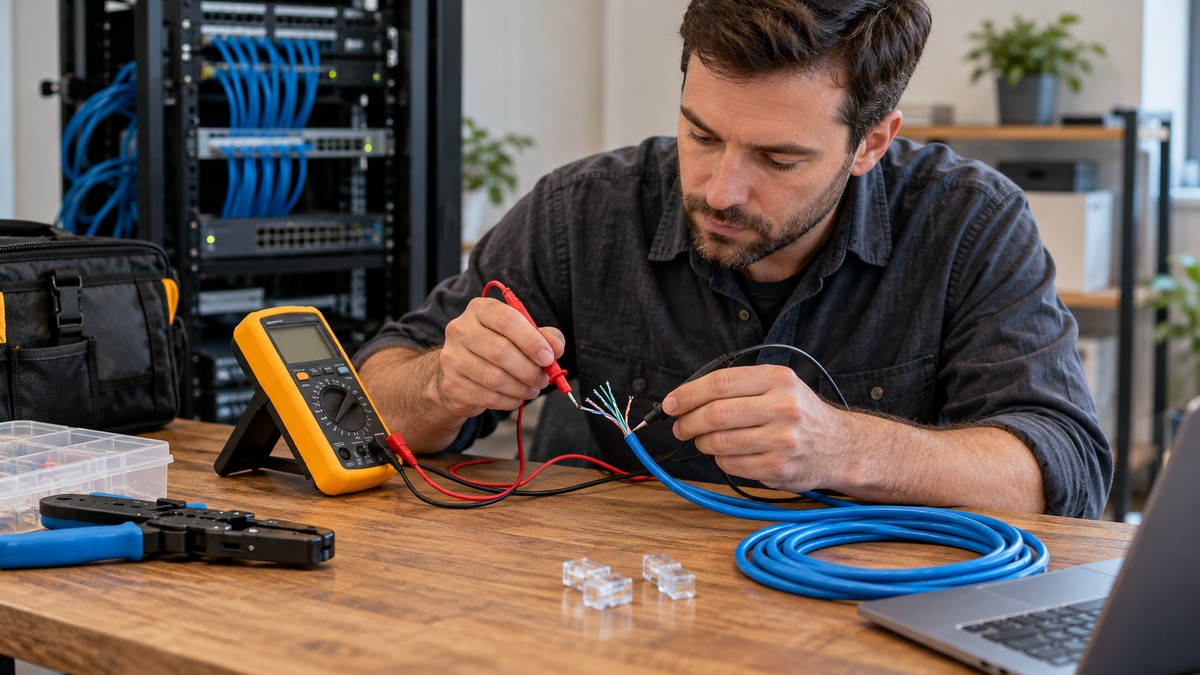
A multimeter measures resistance and emits a beep when it detects continuity, which confirms that a wire is intact. An Ethernet cable holds eight conductors in four color-coded pairs, so the check runs one conductor at a time. Each beep or silence answers a single yes or no question about one wire.
Engineer Fix describes a standard multimeter as a fast, cost-effective way to find a cable’s most basic fault, a break or a short. It adds that the meter cannot detect signal loss, known as attenuation, and cannot measure crosstalk, the interference between adjacent pairs that can reduce network speed. The same guide says the tools needed to confirm a Category rating such as Cat 5e or Cat 6 are different from a meter.
Fluke Networks lists the common network tests for datacom cabling as length, wiremap, attenuation, NEXT, DC loop resistance and return loss. Its overview separates qualification testers, which decide whether an existing link can support a given speed, from certification instruments, which give a pass or fail against industry standards. Fluke is the maker of those testers, so read its page as a description of the test categories, not as a comparison.
The LINK-PP guide says an RJ45 cable tester detects miswiring, reversed pairs and split pairs. LINK-PP makes connectors, so its claims are vendor material and should be checked against a tester’s own manual.
Features to check on the listing
The table below lists the features that the sources tie to an Ethernet check. Where a source gives no figure for a feature, the table says so, and the figure must come from the listing you are considering.
| Feature | What the sources say | What to confirm before you buy |
|---|---|---|
| Continuity beeper | Continuity mode is usually marked with a diode symbol or a speaker icon, and it beeps when a connection is detected. | Confirm the listing or manual names a continuity mode with a beeper. |
| Beeper threshold | The Fluke 110 to 117 manual says the beeper turns on below 20 ohms and turns off above 250 ohms. | The sources give no threshold for other brands. Check the manual of the model you buy. |
| Low-ohm reading | A good short patch cable reads very close to zero ohms, typically between 0 and 1 ohm, on the resistance setting. | Confirm the meter has a low ohm range. The Fluke manual lists a range from 0.1 ohm to 40 megohms. |
| Test leads | The Fluke manual says to check the test leads for continuity before use. | The sources give no CAT rating or probe tip size for the leads. Check the listing. |
| CAT rating | The Fluke manual states CAT IV 600 V for the 110 and 114 models and CAT III 600 V for the 115 and 117 models. | Read the rating from the listing or manual. The sources give no rating for other meters. |
How we chose
We chose the features above because each one changes the result of a continuity check on a network cable. A beeper and its threshold decide whether a beep means a closed path. A low-ohm range decides whether a short patch cable reads as good. Lead condition decides whether a reading means anything. The CAT rating decides whether the meter fits the circuit you use it on.
Each page was opened with curl on 2026-10-21, and each quote or paraphrase was checked against the fetched text. The sources list at the end gives every page the draft relies on. The article does not rank meters, does not name a model as a recommendation, and cites no retailer listing for procedure or safety claims.
Step by step: the basic continuity check
These steps check each conductor with a meter in continuity mode. They do not replace a network cable tester, and they apply only to a cable disconnected at both ends.
- Disconnect the cable from all devices at both ends. The Fluke manual says to disconnect circuit power before testing continuity.
- Set the meter to continuity mode. Engineer Fix notes that the symbol is usually a diode or a speaker icon.
- Check the test leads for continuity before use, as the Fluke manual advises.
- Run a straight-through test. Touch one probe to pin 1 on one connector and the other probe to pin 1 on the far connector. Engineer Fix says pin 1 on one end connects to pin 1 on the far end, and so on through pin 8. Repeat for each pin. A beep means that wire is intact.
- Run the pair test. At the far end, connect pin 1 to pin 2 with a short wire. At the near end, test between pin 1 and pin 2. The allmultimeterguide page repeats this for all four pairs, which are pins 1-2, 3-6, 4-5 and 7-8.
- Read the results. A beep means the wire is intact. No beep, or an OL reading, means an internal break. A beep on every pair means the cable passes this continuity check, and no beep on a pair identifies the broken wires.
Pinout reference
The T568B order, from pin 1 to pin 8, is orange/white, orange, green/white, blue, blue/white, green, brown/white and brown. The CBT Nuggets guide gives this order and says that T568A swaps the green and orange pairs. The two arrangements are not interchangeable, so both ends of a cable should follow the same standard.
A straight-through beep test confirms that each pin reaches the same pin at the far end. It does not show which color sits on which pin. For that, the sources point to a cable tester: if the lights on an RJ45 tester flash out of order, the connector was terminated incorrectly. iFixit gives the same pattern in its guide, where a light sequence that does not line up suggests swapped wires.
Common mistakes
- Testing without a return path. The allmultimeterguide page says that without a return cable, the meter cannot complete the test circuit, which is why the pair test uses a short loopback wire.
- Reading a beep as proof of speed. The meter cannot measure attenuation or crosstalk, so a passing beep does not show that a link will run at gigabit speeds.
- Testing a cable that is still connected to powered equipment. The Fluke manual says to disconnect circuit power first. iFixit advises using only cable testers you trust, because some may not limit the current they send through the data lines.
- Skipping the lead check. The Fluke manual asks you to check the test leads for continuity before each use.
- Assuming one CAT rating covers every meter. The Fluke manual states different ratings for different models, and the sources give no rating for other meters.
When a network cable tester is the better tool
Choose a network cable tester when the question is whether a link will carry a given speed, or which pin is wrong. Fluke says qualification testers decide whether an existing link supports Fast Ethernet, VoIP or Gigabit Ethernet. Certification testers give a pass or fail against industry standards, and Fluke notes that many structured-cabling manufacturers require certification before they grant warranties. A simple RJ45 tester covers the pin sequence, which a multimeter does not show on its own.
FAQ
Can a multimeter check an Ethernet cable?
Yes, for basic continuity. The allmultimeterguide page answers “Yes, but with limitations,” and adds that a multimeter cannot diagnose signal level or frequency problems.
Which setting should I use?
Use continuity mode, usually shown as a diode symbol or a speaker icon. If you use the resistance setting instead, Engineer Fix says a good short patch cable reads very close to zero ohms, typically between 0 and 1 ohm.
Does a beep mean the cable will run gigabit Ethernet?
No. Engineer Fix says a standard multimeter cannot assess the characteristics a cable needs for high-speed networking, including attenuation and crosstalk. Fluke places that check in its qualification and certification testers.
What CAT rating do I need for Ethernet work?
The sources we opened do not say which CAT rating a data-cable check needs. Read the rating from the listing or manual and match it to the circuit you test. Fluke advises choosing a rating for the highest category you could potentially use the meter in.
Do both ends of the cable need the same wiring standard?
Yes, when you build a cable. The CBT Nuggets guide says T568A is not interchangeable with T568B, so match the standard on both ends of a patch cable.
Can a multimeter find reversed or split pairs?
The sources we opened say an RJ45 cable tester detects reversed and split pairs. They do not show a multimeter doing that, so this article does not claim that a meter can.
What we could not verify
The sources we opened do not cover the points below. This article does not fill those gaps, and the listing or manual is the place to check each one.
- A CAT rating for any meter other than the Fluke 110 to 117 models in the manuals. The sources give no CAT rating for any other meter.
- A beeper threshold for any meter outside the Fluke 110 to 117 family.
- Which probe tip fits an RJ45 contact, or whether a standard probe reaches a pin inside the connector.
- The voltage on a powered Ethernet port, and what that voltage does to a meter.
- Whether a beep on a long cable run matches the result on a short patch cable.
Check the CAT rating and the probe fit yourself before you rely on a result.
Bottom line
Buy a multimeter with a continuity beeper, a low-ohm range and a CAT rating that suits your circuit. Use it for a basic check of each pair, and move to a network cable tester when the question is speed or pin order. For the meter’s basic setup, read our continuity tester guide, and for CAT ratings, see our CAT III 600 V meter roundup.
Sources
- https://www.fluke.com/en-us/learn/blog/safety/multimeter-guide
- https://www.fluke.com/en-us/learn/blog/safety/safe-test-tools-real-world-use
- https://www.osha.gov/electrical
- https://www.osha.gov/laws-regs/regulations/standardnumber/1910/1910.333
- https://www.fluke-direct.com/pdfs/cache/www.fluke-direct.com/ib117k/manual/ib117k-manual.pdf
- https://docs.rs-online.com/d339/0900766b80a005ed.pdf
- https://www.flukenetworks.com/expertise/learn-about/cable-testing
- https://engineerfix.com/how-to-test-an-ethernet-cable-with-a-multimeter/
- https://allmultimeterguide.com/how-to-test-wires-with-a-multimeter/
- https://electrouniversity.com/how-to-test-ethernet-cable-with-multimeter/
- https://www.link-pp.com/knowledge/how-to-test-network-cable.html
- https://www.ifixit.com/Guide/How+to+test+an+Ethernet+Cable/158750
- https://www.cbtnuggets.com/blog/technology/networking/what-is-t568b-wiring