Best Electrical Multimeter for Lithium Batteries: Safe Voltage Checks
As an Amazon Associate we earn from qualifying purchases. Details
Updated 19 October 2026
Author: Editorial team, bestmultimeter2020.com
The best electrical multimeter for lithium batteries is a DC voltage meter that you use carefully, with a rest period before each reading and a firm rule to stop when a battery looks damaged. A lithium pack reads differently from a lead-acid battery, so the chart you compare against matters as much as the meter. This guide explains the setting to use, how long to let a battery rest, what a 12V LiFePO4 chart says, and the signs that mean you should not probe the battery at all.
Quick answer
- Use the DC volts setting. A lithium pack is a DC source, and the battery maker’s own guide sets the dial to DC volts or a 20 V range.
- Let the battery rest for at least 30 minutes before you read it. The LiTime guide says a stable resting voltage is the only reading that works for a charge estimate.
- For a healthy 12V LiFePO4 pack, the LiTime guide gives a range of 10.8V to 13.8V after the rest. Use the chart for your own battery.
- If a battery is swollen, leaking, hot or damaged, do not probe it. The EPA and a university safety guide both say to handle it as a hazard.
Why a lithium pack needs a different routine
Lead-acid batteries are often checked with the engine off and a chart in hand. Lithium packs need a rest period for a different reason. The LiTime guide explains that many users get inaccurate readings because they measure while charging or discharging. Its words are “Many users test battery voltage while charging or discharging and get inaccurate readings.” Its definition of resting voltage is the one used in this guide: the reading “measured after disconnecting the battery from all chargers, inverters, and loads (no current in/out) and letting it rest for 30 minutes.”
The same guide adds a second rule for high current. It says “After high-current charging/discharging (0.5C or higher), rest for 2 hours for stable readings.” So a pack that has just been charged hard, or has just run a large load, needs more time than a short rest. The reading you take early after use is not the number you should write down as the state of charge.
The guide also says “Only a stable resting voltage works for accurate SOC calculation.” SOC means state of charge. The message for a reader is simple: measure only at rest, and treat any reading taken during charging as the charger’s voltage, not the battery’s.
What the meter has to do
The meter for this job needs three things. It needs a DC volts function, a range that covers the pack’s voltage, and a display that shows changes of a tenth of a volt or finer. Each has a reason.
The DC function is the first requirement. The Fluke DC voltage guide starts with the dial: “Step 1. Turn Dial to DC Voltage”. A lithium pack is DC, so an AC setting gives the wrong kind of reading.
The second requirement is range. The Fluke DC guide says “Modern DMMs default to Autorange based on the function selected on the dial.” The LiTime guide gives a practical instruction for the range: “Set the dial to DC Voltage (DC V); or select 20V range or auto-range.” Autorange is the simplest choice for a 12V pack. A fixed 20 V range is also suitable for the range the LiTime guide names.
The third requirement is resolution. The formula is step size equals range divided by counts. For example, a 20 V range with 2,000 counts gives 20 divided by 2,000 = 0.01 V per step. That is one hundredth of a volt, which is fine for the chart that follows. The count figure in this example is chosen for illustration and is not a reading from a product in this batch.
| Need | Why it matters for lithium | What to check |
|---|---|---|
| DC volts function | The pack is DC, and the chart expects DC volts | Dial marked DC voltage |
| Range | The pack’s voltage must sit inside the range | Autorange, or a 20 V fixed range |
| Resolution | The chart uses steps of a few tenths of a volt | Step size from the formula above |
| Probe jacks | Wrong jacks give wrong readings | Black lead in COM, red lead in the V and ohms jack |
Step-by-step: a resting reading on a lithium pack
The steps below combine the LiTime guide’s rest rule with the Fluke meter steps. Follow them in order.
- Disconnect the battery from every charger, inverter and load. The LiTime guide’s definition of resting voltage depends on this.
- Wait at least 30 minutes. If the battery has been charged or discharged hard, the guide’s rule is 2 hours after high current.
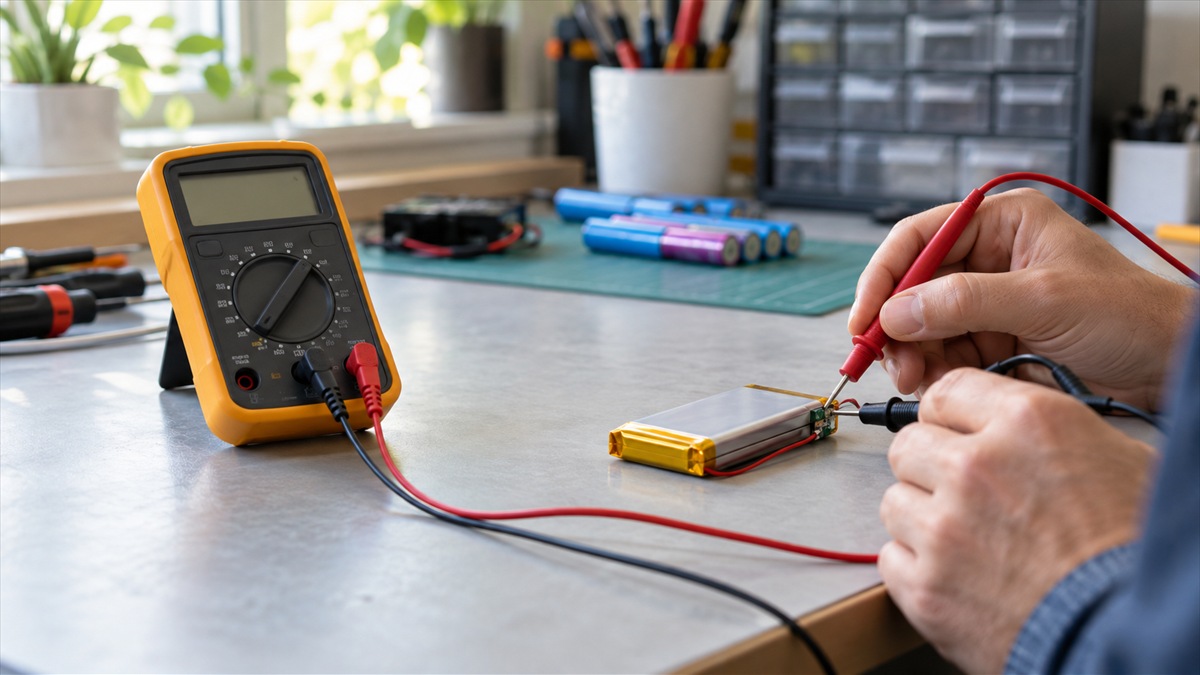
- Set the meter to DC volts, or to a 20 V range. Insert the black lead into COM and the red lead into the V and ohms jack.
- Touch the red probe to the positive terminal and the black probe to the negative terminal. The Fluke guide notes that “Most modern multimeters automatically detect polarity.” A reversed reading on such a meter shows a minus sign, so you can swap the probes without harm.
- Read the display and write the number down with the time, the rest period and whether the battery was just in use. The LiTime guide’s step says “Read and record the displayed value”.
Wear insulated gloves if the battery is large, and keep metal tools from bridging the terminals. Treat every step as a check on a battery that could fail, not as a routine test.
Reading the 12V LiFePO4 chart
The LiTime guide gives a range for a healthy 12V LiFePO4 pack. Its words are “After 30 minutes of rest, a healthy 12V LiFePO4 battery reads between 10.8V – 13.8V.” That range is for a 12-volt pack of that chemistry. It is not a rule for every lithium battery, and it does not apply to a 3.7 V cell or a 24 V pack without scaling.
The guide also says that a reading near the top of its range does not always mean a full charge. The reason it gives is protection circuitry: “LiFePO4 batteries have built-in overcharge protection, which may cause false low voltage after full charge.” The same page then suggests adding a fixed amount to the reading before matching it to the chart. We could not confirm that correction from any second page we opened, and the pages we opened do not agree on how to handle protection-related readings. Our advice is to read the battery maker’s own specifications before adding or subtracting anything.
| Situation | What the LiTime guide says | Practical step |
|---|---|---|
| Reading taken during charging | Charger voltage is shown, not the battery’s true voltage | Wait and measure again at rest |
| Reading taken after 30 minutes of rest | Healthy 12V LiFePO4 reads 10.8V to 13.8V | Compare with the battery maker’s chart |
| Full pack reads low after charge | Overcharge protection may cause a false low reading | Check the maker’s specifications before correcting |
| Reading taken after high current | Rest 2 hours for stable readings | Measure again after the longer rest |
When to stop and not probe the battery
Some signs mean the reading is the wrong thing to chase. The EPA tip sheet on damaged and defective batteries says that “All battery chemistries, including lithium, alkaline and lead-acid, can pose health and safety risks when they are damaged or defective.” It lists the signs to look for: “Signs of battery damage may include bulging or swelling, odors, excess heat, smoke, discoloration, corrosion, damaged wires, leaking and odd noises.”
The EPA also says that “damaged and defective lithium batteries pose greater health and safety risks than other chemistries.” For storage, its advice is to “Store damaged and defective batteries individually” and to keep them bagged in non-flammable materials. A swollen or hot pack is not a meter job. Move it away from anything that can burn, stop, and contact the local hazardous waste program or a battery collection service.
The Western Michigan University lithium-ion guidance is written for campus staff, but its damaged-battery steps are clear. It says “Inspect batteries for damage before use and promptly dispose of damaged ones.” It also says “If leaking material is present, do not touch it.” Its disposal section adds “Tape exposed terminals to prevent short circuits.” The guide notes that “Caution is crucial due to the potential for fire” when lithium cells are mishandled. A meter is useful on a healthy pack. It is not a way to check a damaged one.
Storage and the reading you take later
A battery that sits for a long time changes its state of charge. The WMU guidance says to “Store batteries not actively used for more than 3 days in a designated storage area.” If a pack has been in storage, take a resting reading after the rest period and compare it with the chart again. A reading from a battery that has just come out of storage and gone straight into use is not a fair test of its state.
How we chose
We chose pages written for the job. The LiTime page is a battery maker’s guide to 12V LiFePO4 resting voltage, so it is useful for the chart, but it is a manufacturer’s own guidance and describes its own packs. The EPA tip sheet and the WMU guidance cover damaged and defective lithium batteries. The Fluke DC voltage guide covers the meter steps. We opened each page and checked each quoted line against the text.
We did not name a meter model. The pages we opened do not compare meters for lithium packs, and this batch has no product listing data to rank from. The guide sets out what the meter must do, so a reader can check any meter against the same list.
What we could not verify
The pages we opened do not give a voltage table for lithium-ion, LiPo or other chemistries beyond the 12V LiFePO4 chart. A 3.7 V cell or a 24 V pack needs its own chart from the maker.
Rest time is a maker’s specification, and the pages we opened give only the LiTime rule. This guide uses the 30-minute rule with the 2-hour rule for high current, and leaves the final rest time to the maker’s own specification for the pack in front of you.
The pages do not give a safe voltage threshold for deciding that a pack is dead. The chart gives healthy and unhealthy readings only in rough terms.
The overcharge-protection correction on the LiTime page could not be confirmed from a second page, so this guide does not apply it.
We could not verify the accuracy of any meter for lithium readings, because no meter specification is in the pages we opened.
FAQ
Can a standard DC multimeter check a lithium battery?
Yes, for a resting voltage reading, provided the battery has rested for the time the maker gives. The meter does not need a special lithium setting. What matters is the rest period, the DC function and the chart you compare against.
How long should a lithium battery rest before I measure it?
The LiTime guide says at least 30 minutes. After high current, it says 2 hours for stable readings. Use the battery maker’s rest time if it is longer.
Why does a full lithium pack sometimes read low?
The LiTime guide says overcharge protection may cause a false low reading after a full charge. That is the battery maker’s explanation, and we could not confirm the correction from a second page.
What should I do if the battery is swollen or leaking?
Do not probe it. The WMU guidance says “If leaking material is present, do not touch it.” Keep it away from anything that can burn and contact a hazardous waste program or a battery collection service.
Does a voltage reading tell me the battery is safe to use?
No. A reading shows the pack’s voltage at rest. It does not show damage inside the cell. The EPA lists swelling, heat, odors and leaking as signs of damage that a reading cannot show.
Bottom line
Use a DC volts setting, rest the pack at least 30 minutes, compare the reading with the maker’s chart, and stop if the battery shows any sign of damage.
For related meter choices, see the hand-held multimeter guide and the auto ranging guide.
Sources
- LiTime: How to Test 12V Battery Voltage with a Multimeter: the rest-time rule, the 12V LiFePO4 range and the overcharge-protection note, from a battery maker’s own guide
- U.S. EPA: Collecting Household Small Format Damaged and Defective Batteries (tip sheet): the damage signs, the greater risk of damaged lithium batteries and the storage advice
- Western Michigan University EHS: Lithium-ion Battery Safety Guidance: the inspection rule, the leaking-cell rule, the terminal taping step and the storage rule
- Fluke: How to Measure DC Voltage with a Digital Multimeter: the DC dial setting, the probe jacks, the autorange default and the polarity note