Arruilys TA621 High Precision Digital Hygrometer Review
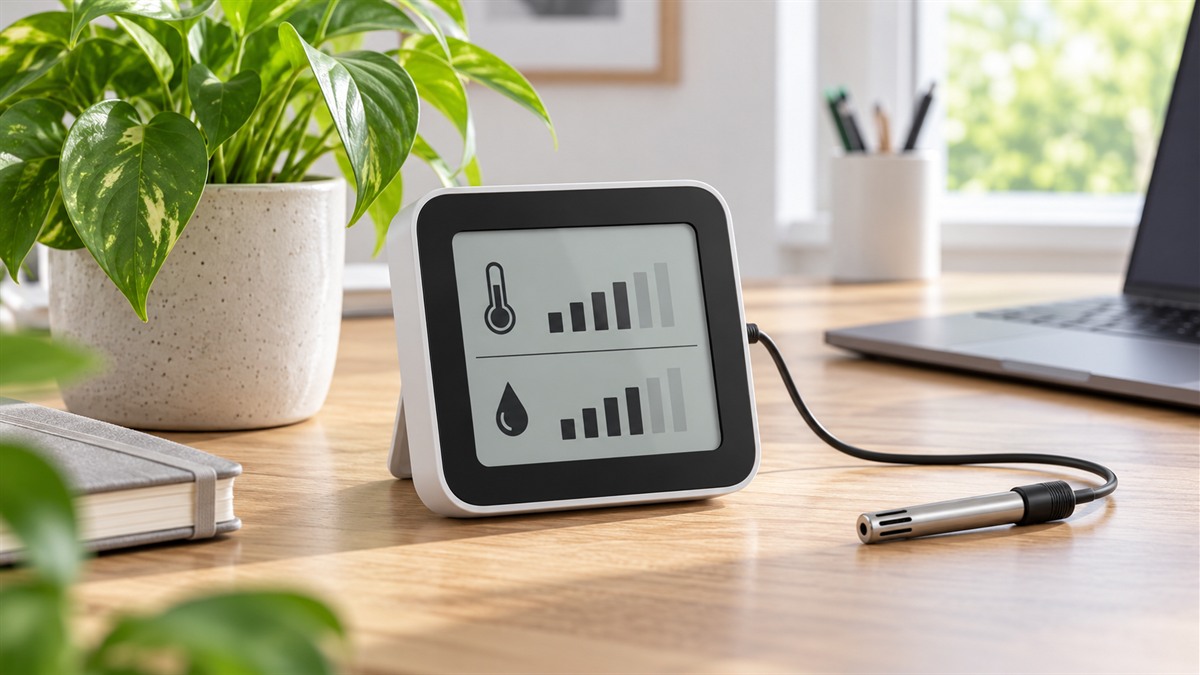
If you have ever stood in a room wondering whether the air is too dry for a violin, too damp for a cellar shelf, or just right for a tray of seedlings, a single wall thermostat rarely answers the question. A small handheld meter that shows temperature, relative humidity, dew point and wet bulb on one backlit screen can fill that gap. The Arruilys TA621 is built around that idea. This review explains what the product offers, where its published details leave gaps, and how to decide whether it fits the way you check conditions.
Product details in this review come from the Amazon product listing and the seller’s description.You can see the product page here: Arruilys TA621 on Amazon.
The Short Verdict
The TA621 suits someone who wants a pocket-sized, battery-powered meter that reports several climate readings at once and flags readings outside limits the owner sets. It works well for walking through a house or a storage area and comparing spots with the same device. It is a weaker match for anyone who needs an audible alarm, a remote probe, a wall-mounted monitor, or a record of readings over time. Its humidity accuracy is published as a band rather than one figure, so the most useful way to read it is as a dependable indicator inside the stated range, not as a laboratory standard.
Who Should Buy and Who Should Skip
Who Should Consider This Meter
- Hobbyists who keep a humidor, a plant room or a small storage cabinet and want to check conditions by hand.
- Homeowners who move between a basement, a bedroom and a garage and want one device for all three.
- Buyers who want dew point and wet bulb values without a wet gauze or a separate calculator.
- People who like a clear display with a backlight and digits that change color as a visual warning.
Who Should Skip It
- Anyone who needs a loud alarm. The limit alert is visual only: the digits change from white to red, and there is no audible signal to call you over.
- Anyone who needs the sensor on a cable, inside a sealed box, or in a remote spot while reading the display from across the room. No probe or remote sensor is described.
- Anyone who wants to record readings over days or weeks. No data logging, memory export or app connection is described.
- Anyone who needs a wall-mounted or shelf-mounted monitor. The mounting type is handheld, and no stand, hook or bracket is described.
Key Specifications in Plain Terms
| Specification | Listed value | What it means for you |
|—|—|—|
| Temperature accuracy | ±1.5°C (±3°F) | Readings can sit a few degrees from the true value. That is workable for everyday room checks but is not a tight control tolerance. |
| Relative humidity range | 0% to 100% RH | The full scale, so the meter can read very dry air and fully saturated air. |
| Relative humidity accuracy | ±5% RH from 20% to 80% RH; ±8% RH outside that band | Most indoor readings fall in the tighter band. Very dry or very damp air carries a wider margin. |
| Dew point and wet bulb | Calculated from temperature and humidity; range -20°C to 60°C (-4°F to 140°F) | You get the derived values without a wet wick. Both come from the same sensor, so an error in either input carries into both results. |
| Ambient temperature range | Upper limit 60°C (140°F). Lower limit Not confirmed: one field gives 20°C and another gives -20°C, and the -4°F figure matches -20°C | Check the lower limit in the manual before using the meter in a cold garage, shed or unheated room. |
| Sampling and display refresh | Samples 8 times per second; display refreshes about 3 times per second | Readings settle quickly, and the screen updates often enough to watch a change happen. |
| Operating voltage | Not confirmed: one field lists 1.2 V, while the power source is 1.5 V AAA cells | The battery type is clear, so the voltage field is the outlier. Use the AAA cells the power field names. |
| Auto power-off | About 15 minutes of inactivity; can be disabled | Saves battery life by default. Turn the feature off for long observation sessions. |
| Display | Backlit LCD, 37 × 41 mm (1.46 × 1.61 in) | Large enough to read at arm’s length, and the backlight helps in dim rooms. |
| Size and weight | 152 × 55 × 33 mm (5.98 × 2.17 × 1.30 in); about 125 g (4.4 oz) | Light enough to carry in a pocket or bag, with a slim body that sits easily in one hand. |
| Power | Three 1.5 V AAA batteries, included | Standard cells that are easy to find and replace. |
| Limit alerts | User-set upper and lower limits for temperature and humidity | You choose the thresholds, and the digits turn red when a limit is reached. |
| Included items | Storage bag, protective sensor cap, user manual, three AAA batteries | Ready to use straight from the box. |
| Warranty | One-year manufacturer warranty | Keep proof of purchase with the box. |
What the Numbers Mean in Daily Use
The ±1.5°C temperature band is the more forgiving figure in everyday life. A gap of a few degrees rarely changes what you do in a room, but it matters if you compare a space against a fixed target or against a reference thermometer. Humidity is different. The ±5% RH figure for mid-range air is the number to plan around, and the wider ±8% RH band applies when the air is very dry or very damp. If your task depends on tight humidity control, treat the TA621 as an indicator and confirm its readings against a second device you already trust.
Dew point deserves a short explanation. It is the temperature at which air reaches saturation, and it helps you judge where condensation may form on a cold window, a pipe or a wall. Because the meter calculates dew point from its own temperature and humidity readings, the same accuracy limits apply to it. Wet bulb is a related value that people use when judging evaporation and drying conditions. The meter provides both numbers without a wet cloth, which is the convenience the product details emphasize.
Relative humidity moves with temperature. A room that warms up will show a lower humidity reading even when the amount of moisture in the air has not changed. That is why the meter shows both values, and why dew point is useful alongside relative humidity when you are judging condensation risk.
Practical Use Cases
A humidor or cigar box. A compact handheld meter with a visual limit alert is easy to slip into a cabinet for a quick check. Set the upper and lower limits to the range you prefer, then look for the digits to turn red. Because the alert is visual, you have to glance at the screen. There is no buzzer.
A seed-starting shelf or plant room. Before you mist seedlings or open a humidity dome, check temperature and humidity together. The dew point reading helps you see when the air is close to saturation, which is useful for judging whether moisture will collect on the cover.
A basement or storage room. The handheld format lets you walk the space and compare corners and shelves. Check the lower temperature question in the specifications table before you rely on the meter in an unheated area.
A bedroom or home office. The backlight makes the display readable at night without a bright light, and the auto power-off protects the batteries if you forget to switch the meter off.
A room-to-room comparison. Use the same meter, take one reading per room at the same height and time of day, and write the results down. Differences between rooms are more meaningful than any single number if you keep the method consistent. This is a practical habit, not a claim about how the device performs.
Placement and Reading Habits
Good readings depend as much on where you hold the meter as on the meter itself. Keep it away from direct sunlight, heaters, stove vents, humidifier outlets and open windows, because those sources create local air conditions that do not represent the room. Let the meter sit in the spot you want to measure for a few minutes before you read it, especially if you have just carried it in from a cold or warm space. Hold it at the height where people spend time, not on the floor or against a wall. For a cabinet, leave the door open long enough for the reading to settle, then close it if you want to check a sealed-box condition. These are general measurement habits, and they apply to any handheld hygrometer.
The sensor cap protects the sensor when you carry the meter. The listing does not say whether the cap should stay off during readings, so check the user manual before you use the cap as a fixed shield. Clean the body with a dry cloth. Do not immerse it, because no water resistance specification is described.
Setup, Fit and Compatibility
Insert the three AAA batteries that come in the box. The power field names 1.5 V AAA cells, so use standard AAA batteries and disregard the conflicting voltage field.
The product details describe these button actions:
- Hold HOLD/UNIT for two seconds to cycle between temperature, dew point and wet bulb.
- Hold both left buttons for two seconds to switch to Fahrenheit, and hold both right buttons for two seconds to switch to Celsius.
The auto power-off turns the meter off after about 15 minutes of inactivity, and the product details say it can be disabled. The button sequence for disabling it is Not stated in the listing, so check the user manual before you need the change.
Fit is simple because the meter is handheld. No wall mount, stand or hook is described, so plan on a shelf, a drawer or your pocket. Connectivity is Not stated in the listing, which means you should not expect Bluetooth, Wi-Fi or an app. Outdoor use is also Not stated in the listing, so do not assume the meter suits a porch or a shed until the manual confirms the operating range.
Strengths and Limitations
Strengths Worth Weighing
- Four readings on one device: temperature, relative humidity, dew point and wet bulb. Many simpler meters show two.
- A backlit display with high-contrast digits and a color change for limit alerts.
- Quick sampling, so readings respond to changes without long delays.
- Limit alerts for both temperature and humidity, set by the owner.
- A min/max hold function, named in the product title, that helps you note a peak or low when you step away.
- Standard AAA batteries that are easy to replace.
- A storage bag and sensor cap that protect the meter when you carry it.
- A one-year manufacturer warranty.
Limitations and Open Questions
- The alert is visual only. If you need to know when a limit is crossed while you are in another room, this meter does not provide that.
- The 60°C upper limit rules out hot spaces such as ovens, kilns and engine bays.
- Humidity accuracy is published as a band. Readings at the extremes are less certain than readings in the middle of the range.
- The lower temperature limit remains unresolved, as the specifications table explains, so verify it before cold-storage use.
- The voltage field conflicts with the battery type, as noted in the table, so rely on the AAA cells.
- No calibration certificate or traceability is described. Treat the readings as indicators, and compare with a reference device if you need a documented number.
- No data logging, connectivity or remote display is listed.
Comparing the TA621 With Other Options
When you compare hygrometers in this category, five factors decide most day-to-day outcomes: the humidity accuracy band, the temperature range, the alert style, the mounting options and the power-saving behavior.
One comparison point from the same research set is a Protmex HT607 model. Its published details include a tighter humidity accuracy band of ±3% RH between 20% and 80%, a 30-minute auto power-off, a tabletop mounting type and a larger screen. Those are that model’s figures, not the TA621’s, and they show what buyers often weigh in this category. If mid-range humidity precision is your main concern, the Protmex figure gives you a yardstick to hold the TA621’s ±5% against. The same Protmex data also lists dew point, wet bulb, a backlight and a maximum and minimum function, so none of those features is unique to the TA621 within this category. The TA621’s own details stand out for four readings on one unit, a color change for limit alerts and a shorter 15-minute auto power-off.
When you look at any alternative, ask the same questions: What is the humidity accuracy band? Which values are shown at once? Does the alert need a glance or a sound? Can you mount it, or must it stay in your hand? How long does it stay on without input?
Decision Checklist and Pre-Purchase Checks
Decision Checklist
Work through these questions before you buy:
- Do you need an audible alarm? If yes, this meter is not a match.
- Do you need a remote probe, a wall mount or data logging? If yes, look at other models.
- Is a ±5% RH band across the 20% to 80% range acceptable for the job?
- Does a 60°C upper limit cover every place you plan to measure?
- Will you use the min/max hold function named in the title?
- Are AAA batteries and a one-year warranty acceptable compared with other options you are considering?
Before You Buy: Checks
- Confirm that the model you receive is the TA621 with ASIN B0H96X2X68 on the packaging, matching the product page at Arruilys TA621 on Amazon.
- Count the parts in the box: meter, storage bag, sensor cap, user manual and three AAA batteries.
- Read the lower temperature limit and the auto power-off steps in the manual, because the product details leave both open.
- Run the meter beside a second device you already trust for a day in the room where you plan to use it, then decide whether the two agree closely enough for your purpose.
- Read the warranty terms that come with the device and keep proof of purchase.
Frequently Asked Questions
Does the TA621 make a sound when a limit is reached?
No. The product details describe a visual alert only, with the digits turning red. No audible alarm is listed.
Can it be mounted on a wall?
The mounting type is handheld. No wall mount, stand or hook is described, so plan on a shelf or in your pocket unless the manufacturer confirms an accessory.
Does it connect to a phone or computer?
Connectivity is Not stated in the listing. No app, Bluetooth, Wi-Fi or data connection is described.
Can I use it outdoors?
Outdoor use is Not stated in the listing. Given the 60°C upper limit and the unresolved lower limit, check the manual before taking the meter outside.
How do I turn off the auto power-off?
The product details say the function can be disabled, but the button sequence is Not stated in the listing. Check the user manual that comes with the meter.
Final Verdict
The Arruilys TA621 is a small, handheld hygrometer for people who want temperature, relative humidity, dew point and wet bulb on one backlit unit, with limit colors they set themselves. Its strengths are the number of readings, the clear display and the standard battery format. Its limits are the visual-only alert, the humidity accuracy band, the open questions about the lower temperature limit and the battery voltage field, and the lack of logging or mounting options.
Buy it for hand-held checks where a visual warning is enough and where you can confirm the open details in the manual. Skip it if you need audible alarms, remote sensing or a documented calibration. You can review the full product details on Amazon at Arruilys TA621 on Amazon.