How to Choose a Multimeter for Checking Lithium Batteries
As an Amazon Associate we earn from qualifying purchases.
How to choose a multimeter for checking lithium batteries comes down to a DC volts setting, a range that covers the battery voltage, and enough resolution to tell apart the voltages that matter for that chemistry. Most lithium cells are checked by reading the voltage of one cell at a time against the cell maker’s limits. A multimeter does not show capacity or health by itself, and the sources we opened do not say that it can. Work on any battery pack should stay at low voltage and on the bench.
Electrical safety first
Work on mains circuits can kill. Electric shock is driven by current through the body, and the Massachusetts Institute of Technology safety office notes that “Current (amperes) is the killing factor in electrical shock, not the voltage.” The North Carolina State University safety office names “shock/electrocution, arc flash, and fire” among the electrical hazards it covers. Before you measure anything, check that the meter’s CAT rating suits the circuit you are testing, and read the rating from the listing or the manufacturer’s manual. Fluke advises that a test instrument should be “rated to a minimum of CAT III 600 V” for distribution-level work, and that “If your DMM and your leads don’t have the appropriate ratings, DON’T MAKE THE MEASUREMENTS with them.” Panel and service work belongs to a licensed electrician. The MIT page says that “Only licensed electricians are permitted to work on building infrastructural electrical systems.”
This guide covers battery checks only. It does not cover outlets, panels, service wiring or any live mains circuit. The sources we opened do not describe a safe way to measure a live mains circuit with a battery meter, so this guide does not give one.
Quick answer
- Choose a meter with a DC volts range (the V with a straight line on the dial) and a display fine enough for the cell voltage you need to read.
- Check the meter and its leads against the CAT rating in the listing or manual. The listing does not state a CAT rating unless it says so.
- Compare each cell’s reading to the maker’s datasheet. Lithium-ion and LiFePO4 cells use different numbers.
- Store and handle damaged or swollen lithium cells according to the maker’s instructions, and tape the terminals of cells you are storing or recycling.
What a lithium battery check needs
A lithium check is a voltage check. The reading tells you where a cell sits on its voltage curve, and the cell maker sets the limits. The Battery University charging guide says that lithium-ion is typically charged “to 4.20V/cell,” with a tolerance of about 50 millivolts per cell. The same article says that some nickel-based cells charge to 4.10 V per cell and that high-capacity lithium-ion cells may go to 4.30 V, so the reader must check the datasheet for the cell in front of them. The Panasonic NCR18650B datasheet lists a “Nominal voltage 3.6V” and a discharge of “CC 1C, 2.50V cut-off” for that cell. The LiTime guide, a battery vendor’s page, gives a nominal voltage of “typically 3.2V” for a LiFePO4 cell and an “optimal discharge voltage” of 2.5 V. Those are chemistry values, not a rule for every pack.
The Battery University discharge article explains why a meter may read a little above the device cut-off. It says that many devices “turn off when the lithium-ion battery reaches 3.00V/cell on discharge,” and that the protection circuit can open at about 2.50 V per cell. The same article adds that power tools and other high-current devices can reach an early cut-off, and that such batteries “may still have ample capacity left after the cutoff.” A voltage near the cut-off therefore shows where the device stops, not how much charge the cell holds. The sources we opened do not say what a given reading means for every cell type.
Lithium cells are often checked in packs, so the reader must add the cells in series to get pack voltage. Our own arithmetic: three cells in series at the 3.6 V nominal figure from the Panasonic datasheet give about 10.8 V. The sources we opened do not give a pack chart for a specific product, and the battery management system in a pack can change the result, so use the pack maker’s values.
Features to check on the meter
DC volts and the range dial
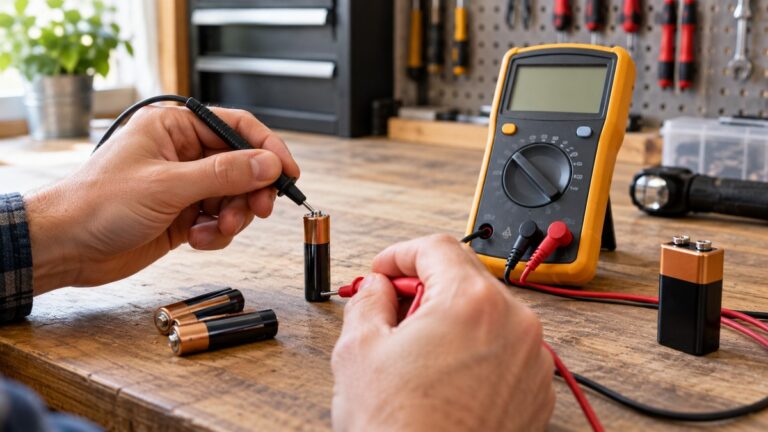
A cell is a DC source, so the meter must be on DC volts. The Fluke vehicle battery guide says to “Set the dial to VDC (DC volts)” and to choose a range for the battery. The SparkFun tutorial shows the same step for a single AA cell, where the meter is set to “2V” in the DC range. The same tutorial says that “Multimeters are generally not autoranging,” so a manual-range meter needs you to pick the range yourself. An auto-ranging meter is defined in the Fluke terminology as one that “automatically selects the proper range” once the function is chosen. Either type works for a DC check, but the reader should confirm the range on the meter before connecting it.
Resolution: counts and digits
Resolution tells you how small a change the meter can show. Fluke’s terminology page says that “Counts and digits are terms used to describe a resolution.” A higher count gives a finer step on the display. For a lithium check, the steps that matter are in the tenths and hundredths of a volt, so the reader should look for a meter whose listing states the DC volts resolution. The listing does not state a count for every model, and the reader should note it when a listing is silent.
True RMS
True RMS is a feature for AC waveforms. Fluke’s true-RMS article says that a true-RMS meter “is the only one that can accurately measure both sinusoidal and non-sinusoidal ac waveforms.” It does not discuss DC battery checks. For a lithium check, true RMS is not the feature to pay for. It matters for AC work, which is outside this guide.
Current ports and fuses
Cell checks are voltage checks, so the current port is not needed for this job. The SparkFun tutorial says that “10A is the special port used when measuring large currents (greater than 200mA).” If a listing gives a fuse rating for the 200 mA or 10 A input, copy it from the listing or manual. If the listing does not state a fuse rating, write that down. The sources we opened do not give a fuse rating for any meter model.
CAT rating and test leads
The CAT rating decides where a meter can be used. Fluke’s test-leads article says to “confirm that the DMM and test leads are rated for the category and voltage level appropriate for the electrical environment they will be used in.” A cell check on a bench is a low-voltage task, but the same meter may be used later on other work, so check the category on the meter and on the leads. For industrial work, the Fluke voltage-tester article says the rating “generally means CAT III or CAT IV.” The overvoltage example in Fluke’s safety article describes a CAT III 1000 V device as one that “must be capable of withstanding an 8,000 V impulse without endangering the user.” If the listing does not state a CAT rating, write “the listing does not state a CAT rating” and do not use the meter on any circuit above low voltage.
How we chose
We chose the criteria in this guide from the pages we opened on 2026-10-21: two Battery University articles, a cell datasheet, a LiFePO4 guide from a battery vendor, an EPA page on lithium-ion batteries, a Fluke battery guide, a SparkFun tutorial, Fluke terminology and test-lead articles, and three university or safety-office pages on electrical hazards. We kept a point only when a page we opened states it, and we checked each quoted sentence against the fetched text. We did not rank meters, and we did not name a model. The criteria are DC volts, range method, resolution, CAT rating and the handling of damaged cells.
How to check a cell, step by step
- Read the cell label and datasheet first. Note the chemistry and the nominal and charge voltages. The Panasonic datasheet gives a nominal voltage of 3.6 V and a charge of 4.20 V for that cell. Your cell may differ.
- Check the cell for damage. The EPA page says that “If the Li-ion battery becomes damaged, contact the battery or device manufacturer for specific handling information.” Stop if the cell is damaged, and follow the maker’s instructions.
- Set the meter to DC volts. Use the V with a straight line. The Fluke guide says to set the dial to VDC.
- Connect the leads. The Fluke guide puts the black lead in COM and the red lead in the V/Ω jack. Keep the leads on the terminals.
- Choose the range. On a manual meter, pick a range above the expected voltage. On an auto-ranging meter, select the voltage function and let it choose the range.
- Read the voltage and compare it. Compare the reading with the datasheet values for the chemistry, and not with a value from a different cell type.
Reading the result
For a lithium-ion cell, a reading near 4.20 V per cell is the usual full-charge figure in the Battery University guide. A reading near 2.50 V per cell is the protection-circuit figure in the same article. For a LiFePO4 cell, the LiTime guide gives a nominal voltage of 3.2 V and a charge figure of up to 3.65 V. The sources we opened do not say what a reading between those points means for a particular cell, or what a reading means after a long rest. The reader should not treat one reading as a verdict on the cell’s health.
Common mistakes
- Using the wrong chemistry numbers. The Panasonic cell’s 4.20 V charge limit is not a rule for LiFePO4. The LiTime guide gives different values for that chemistry.
- Checking a damaged cell. The EPA page says even used batteries “can have enough energy to injure or start fires.” Do not check a damaged cell on the bench.
- Reading a pack as a cell. A pack voltage is the sum of the cells in series. Read each cell where you can access it, and use the pack maker’s values for the total.
- Trusting a meter with the wrong rating. Fluke says that if the meter and leads are not rated for the environment, you should not make the measurement with them.
- Using the current port for a voltage check. Leave the current port alone for a voltage check, and check the fuse rating in the listing before using it.
Frequently asked questions
Can a multimeter tell if a lithium battery is good?
A multimeter gives a voltage reading. The sources we opened do not say that a voltage reading alone shows capacity or health. The Battery University cut-off article says that a battery’s voltage can reach the device cut-off while still holding some charge, so one reading is not a full test.
What voltage should a lithium-ion cell read?
The Battery University guide says lithium-ion cells are typically charged to 4.20 V per cell. The Panasonic datasheet lists a 3.6 V nominal voltage and a 2.50 V discharge cut-off for that cell. Check your own cell’s datasheet.
Do I need a true-RMS meter for a battery?
Fluke’s true-RMS article describes true RMS for AC waveforms. The sources we opened do not say that a DC battery check needs true RMS. For this job, the DC volts function is the setting that matters.
Can I use the 10 A port to measure a cell?
A cell check is a voltage check, and the SparkFun tutorial shows the voltage setting for a cell. The current port is for current above 200 mA, as that tutorial states. Keep the leads on the voltage jacks for a voltage check.
What do I do with a swollen or damaged lithium cell?
Stop the check. The EPA page says to contact the battery or device manufacturer for specific handling information if the battery is damaged. Tape the terminals with non-conductive tape, and keep the cell in a separate plastic bag until it can be recycled.
Does the CAT rating of a meter matter for a battery check?
Yes, because the meter may later be used on other circuits. The Fluke live-measurement article says to check that the meter’s ratings match the work, and the listing or manual must state the rating. If the rating is not stated, the listing does not state a CAT rating, and the reader should not use the meter above low voltage.
Bottom line
Pick a meter with a DC volts range, a range you can set or select, a display that resolves the voltages in your cell’s datasheet, and a CAT rating stated in the listing or manual. Then read each cell against its own datasheet.
What we could not verify
The sources we opened do not give a lithium cell health test or a capacity test with a multimeter. They do not state a CAT rating, count, input impedance or fuse rating for any meter model. They do not cover LiFePO4 pack limits for every battery management system. They do not say whether a standard multimeter’s resistance function gives a usable internal-resistance reading for a lithium cell, so this guide does not claim one. The sources do not give a reading for every state of charge. The Energizer coin-cell datasheet was fetched but its text could not be read, so this guide does not use it. Nothing in this guide is a product claim.
Sources
- https://batteryuniversity.com/article/bu-409-charging-lithium-ion (opened 2026-10-21)
- https://batteryuniversity.com/article/bu-802c-how-low-can-a-battery-be-discharged (opened 2026-10-21)
- https://batteryuniversity.com/article/bu-501a-discharge-characteristics-of-li-ion (opened 2026-10-21)
- https://e2e.ti.com/cfs-file/__key/communityserver-discussions-components-files/196/Panasonic-NCR18650B-datasheet.pdf (opened 2026-10-21)
- https://www.litime.com/blogs/knowledge/the-ultimate-guide-to-battery-voltage (opened 2026-10-21)
- https://www.epa.gov/recycle/used-lithium-ion-batteries (opened 2026-10-21)
- https://www.fluke.com/en-ca/learn/blog/digital-multimeters/how-to-test-a-battery-with-a-multimeter (opened 2026-10-21)
- https://learn.sparkfun.com/tutorials/how-to-use-a-multimeter/all (opened 2026-10-21)
- https://www.fluke.com/en-us/learn/blog/electrical/multimeter-common-terminology (opened 2026-10-21)
- https://www.fluke.com/en-us/learn/blog/electrical/what-is-true-rms (opened 2026-10-21)
- https://www.fluke.com/en-us/learn/blog/electrical/safety-considerations-for-live-measurements-keep-your-eyes-on-the-job-at-hand (opened 2026-10-21)
- https://www.fluke.com/en-us/learn/blog/digital-multimeters/testing-your-test-leads (opened 2026-10-21)
- https://www.fluke.com/en-us/learn/blog/electrical/best-electrical-voltage-testers (opened 2026-10-21)
- https://www.fluke.com/en-us/learn/blog/electrical/safety-voltage-testing (opened 2026-10-21)
- https://ehs.mit.edu/site-page/electrical-safety (opened 2026-10-21)
- https://ehs.ncsu.edu/electrical-safety/ (opened 2026-10-21)
- https://www.fluke.com/en-us/learn/blog/electrical/absence-of-voltage-testing (opened 2026-10-21)
- https://www.fluke.com/en-us/learn/blog/safety/electrical-safety-myths (opened 2026-10-21)
Related reading: auto-ranging digital multimeters compared, the multimeter buying guide, and a product roundup for lithium battery checks.