How to Test a Small Solar Panel With a Multimeter
As an Amazon Associate we earn from qualifying purchases.
This guide explains how to test a solar panel with a multimeter for one job: measuring the open-circuit voltage of a small, low-voltage panel in light, with nothing connected to its output. The method suits a panel whose listing or manual states its open-circuit voltage. The reading shows whether the panel produces voltage and how close it comes to the figure on its fact sheet. It does not show how much power the panel makes. Rooftop arrays, grid-tied systems and high-voltage strings are out of scope for this guide.
Electrical safety
Work on mains circuits can kill. Making contact with a live circuit can result in serious injury or death, according to a trade safety advisory on multimeters, and OSHA’s electrical safety pages list electric shock, electrocution, fires and explosions among the dangers. The Fluke safety guide adds that shock occurs when the human body becomes part of an electrical circuit. This guide covers a small panel on a bench only. It gives no steps for mains, outlets, panels or service wiring.
Check that the meter’s CAT rating suits the circuit you are testing, and read the rating from the listing or the manufacturer’s manual. The Fluke guide to digital multimeter safety says to choose a tool rated for the highest category you could potentially use it in. The GAMBICA guide to overvoltage and measurement categories says measurement terminals must never be connected to a circuit that exceeds the rated voltage or measurement category. The IHSA advisory says to use only multimeters that display the CAT designation. If the listing does not state a CAT rating, do not use that meter for this test.
Panel and service work belongs to a licensed electrician. The OSHA interpretation on qualified employees says only qualified persons may perform testing work on electric circuits or equipment, and the University of Arizona extension guide tells owners to consult an electrician when in doubt.
The University of Arizona guide says solar modules produce direct current electricity. A Panasonic installation manual says modules generate DC when exposed to sunlight or other light sources, and that a single module produces only a low voltage and current, yet shocks and burns are still a potential hazard. A Sanyo HIT installation manual says contact with electrically active parts can result in burns, sparks and lethal shock whether the module is connected or disconnected. Fluke advises assuming every electrical component is energized until it has been positively discharged, so treat the panel as live even when it is disconnected.
Before you connect the leads, turn the panel away from the sun or cover its front with a dark cloth or cardboard. The University of Arizona guide gives that advice for making connections. The Panasonic manual says to cover the entire front surface with a dense, opaque material during installation and handling, and the Sharp installation manual says to cover the surface with cloth or other sufficiently opaque material.
Quick answer
- The safety section above comes first. This guide covers bench work on a small panel only.
- Measure open-circuit voltage with the panel disconnected from any charge controller, battery or inverter.
- Take the reading in full sun or bright light, with no shade on any part of the panel.
- Compare the reading with the fact sheet on the back of the panel, and treat a large gap as a sign to check the module or its wiring.
Before you start
Use a meter that reads DC volts. PVEducation says that in a typical multimeter the negative terminal is the black lead, labeled COM, and that the red lead goes into the V terminal for voltage readings. The University of Arizona guide says to plug the red and black leads into the ports on the front of the meter, and then turn it on.
Check the meter before the panel is involved. The University of Arizona guide says to place the leads on the terminals of a D cell battery and compare the reading with the battery’s rated voltage. Fluke says to use a known voltage source to verify that your meter is working properly.
Find the expected voltage on the fact sheet on the back of the module, as the University of Arizona guide says, and write that number down before you start. Check the connector type as well. The same guide notes that some lower-wattage modules come with alligator clips or round eyelet connectors, while MC-4 plastic connectors need a plastic key to unlock and disconnect.
Pick a sunny day and point the module at the sun, with no shade on any part of it. PVEducation advises this. It also says a temperature gun is only really needed on very hot days, and that the temperature should be read on the back of the module.
Step-by-step test
- Disconnect the panel. Disconnect the panel from any charge controller, battery or inverter so that no load is connected. The University of Arizona guide says open-circuit voltage is checked when there is no load connected to the module, and PVEducation describes the same reading as one taken with no load.
- Set the meter. The University of Arizona guide says to turn the dial to V and check that the meter is in volts DC. Fluke says to set the multimeter to DC voltage mode. PVEducation says to use a DC voltage scale greater than the expected module voltage, and it suggests the 200 V setting if you are unsure. If your meter does not change range on its own, see our guide to auto-ranging digital multimeters.
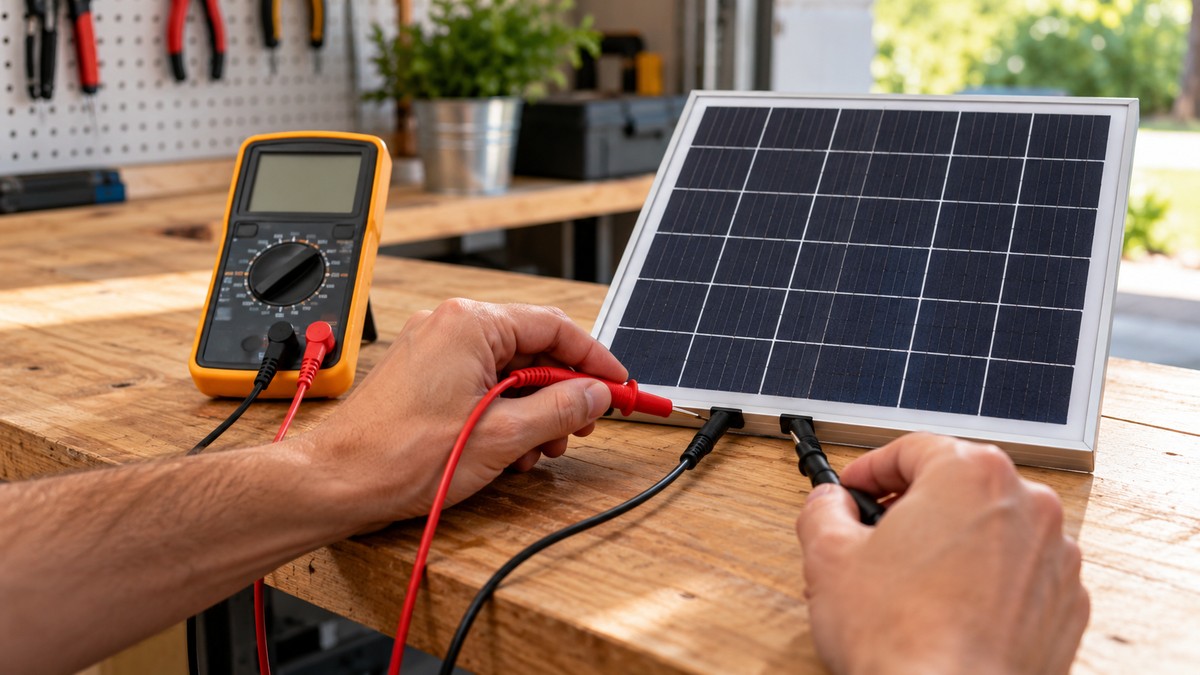
- Cover the panel and connect the leads. With the panel covered or turned away from the sun, touch the red lead to the positive (+) terminal and the black lead to the negative (-) terminal. Fluke describes the same red-positive, black-negative connection.
- Uncover the panel and face the sun. The University of Arizona guide gives full sun as about 1,000 watts per square meter, which it says typically occurs between 9:00 AM and 3:00 PM on a clear, sunny day. Fluke says a bright artificial light source can be used instead. PVEducation warns that shading even part of one corner of the module causes a dramatic loss in output.
- Read and record the voltage. Note the reading, the time of day and the panel temperature. PVEducation says the open-circuit reading goes down as the module heats up, so the temperature belongs in the record.
- Reverse the leads if the reading is negative. A negative sign appears when the positive lead is on the negative terminal, as the University of Arizona guide describes. PVEducation says to switch the leads when the reading is negative.
- Compare the reading with the fact sheet. The University of Arizona guide says large differences between the expected and measured voltage may suggest a module that is not operating, or a wiring connection that may be loose.
Reading the results
Do not compare the open-circuit reading with the maximum-power voltage on the fact sheet. The University of Arizona guide says the open-circuit value is higher than the voltage under load at maximum power.
Temperature changes the reading. The University of Arizona guide says the voltage of a solar module declines as the cells get hotter, and that a fact sheet may feature temperature coefficient values. PVEducation gives a correction for silicon modules: each cell loses about 2.2 mV for each degree Celsius above 25 °C, so the corrected voltage equals the measured voltage plus 0.0022 × N × (T − 25), where N is the number of cells.
As an example, our own assumption is a 36-cell panel read at 35 °C. The correction is 0.0022 × 36 × (35 − 25), about 0.79 V, so the corrected reading is about 0.79 V higher than the reading taken. The cell count and temperature are assumptions, not figures for any real panel.
Light matters too, though less than temperature. PVEducation says open-circuit voltage depends on temperature and, to a lesser extent, on the sun’s intensity. The University of Arizona guide notes that a cloud moving in front of the sun may result in a drop in the irradiance level.
Fluke says a module’s voltage output should be within 10% of its rated output, and that a significantly lower reading may indicate a problem with the module. PVEducation says a voltage measured this way is accurate to within 10%. The table lists only what the sources say about each kind of reading.
| Observation | What the sources say | Source |
|---|---|---|
| Negative value on the meter | The positive lead is on the negative terminal; switch the leads | PVEducation; University of Arizona guide |
| Reading within 10% of the rated output | Fluke describes this as the expected range | Fluke solar guide |
| Reading significantly lower than the rated output | May indicate a problem with the module | Fluke solar guide |
| Reading far from the value on the fact sheet | May suggest a module that is not operating, or a loose wiring connection | University of Arizona guide |
| Lower reading on a hot day | Voltage declines as the cells heat up | University of Arizona guide; PVEducation |
| Lower reading under cloud or in shade | Cloud can reduce irradiance; shading can cause a dramatic loss of output | University of Arizona guide; PVEducation |
A good reading does not prove the panel makes its full power. PVEducation says the method shows that a module is functional and putting out some power, but it does not characterize efficiency or generate a current-voltage curve.
Common mistakes
- Leaving the controller, battery or inverter connected. The University of Arizona guide says the reading is taken with no load connected.
- Testing in shade or under cloud. PVEducation says shading part of one corner causes a dramatic loss in output, and the University of Arizona guide says a cloud can drop the irradiance level.
- Setting the meter range too low. PVEducation says the DC scale should be greater than the expected module voltage.
- Comparing the open-circuit reading with the maximum-power voltage. The open-circuit figure is the higher of the two, according to the University of Arizona guide.
- Making connections with the panel in full sun. The University of Arizona guide advises turning the module away from the sun or covering it when making connections, and the Panasonic manual says to cover the front during handling.
- Forgetting the temperature. PVEducation says the reading decreases as the module heats up, and without a recorded temperature a hot-day reading cannot be corrected with the formula above.
For a broader buying guide to meters, see our multimeter buying guide.
Frequently asked questions
Can a multimeter test a small solar panel?
Yes, for open-circuit voltage. The University of Arizona guide describes this reading with a digital multimeter, and PVEducation calls it a simple first check. Full power output needs a load, as PVEducation notes.
Do I have to disconnect the panel from its charge controller?
Yes, for this test. The sources describe the reading as taken with no load connected.
Why does my reading differ from the number on the label?
The published ratings assume standard test conditions, which the University of Arizona guide describes as the basis for module ratings. Your reading depends on the sun, the cell temperature and any shade on the day you test.
Can I test on a cloudy day?
The sources describe full sun or bright light for this reading. PVEducation gives about 10 to 20% of rated output on a cloudy day, but that figure belongs to its short-circuit current discussion, so do not read it as an open-circuit value.
What does a negative reading mean?
It means the positive lead is on the negative terminal. PVEducation says to switch the leads, and the University of Arizona guide describes the same minus sign.
How we chose
We chose this method from sources that describe a no-load voltage reading on a module, and we checked each quoted sentence against the text of its page on 2026-10-21. A university extension guide and an online PV teaching site carry the core procedure, and a manufacturer blog adds the meter steps and the 10% comparison. Safety claims rest on at least three sources each, except the electrician line explained below. Retailer and vendor pages were not used for procedure or safety.
Of the 28 URLs we opened, eleven supplied the quoted text. Nine returned 403, 404 or no response. Eight were set aside: a duplicate copy of the Arizona guide, two general or vendor pages, a page marked confidential, a federal page that showed a CAPTCHA, an index page, and two pages we did not need for the quoted claims.
What we could not verify
The sources we opened do not give the expected open-circuit voltage for any small panel, so read it from your panel’s fact sheet or label. They also do not set a pass or fail cutoff. Fluke’s 10% comparison refers to rated output, and the source does not say whether it applies to open-circuit voltage alone.
The sources do not set a voltage limit for a low-voltage panel, so the listing or manual decides whether this method fits. They do not cover panels with USB or other built-in outputs, and they give no light level for artificial light. They also do not describe a short-circuit current test, so this guide has none.
None of the sources we opened says a licensed electrician must do panel or service work. Two of them describe qualified persons and consulting an electrician, and the licensed wording comes from this site’s own safety rule. The sources also do not name a CAT rating for any meter, so check the listing of the meter you own.
Sources
- https://extension.arizona.edu/sites/extension.arizona.edu/files/pubs/az1702-2017.pdf: University of Arizona Cooperative Extension, AZ1702, Hand Tools Used For Solar Photovoltaic (PV) Systems (2017)
- https://www.pveducation.org/id/node/998: PVEducation, Simple Module Measurement with a Multimeter
- https://www.fluke.com/en-us/learn/blog/renewable-energy/test-solar-panel: Fluke, How to Test Solar Panels for Common Problems
- https://fluke.com/en-us/learn/blog/safety/multimeter-guide: Fluke, Guide to digital multimeter safety
- https://www.osha.gov/electrical: OSHA, Electrical safety
- https://osha.gov/laws-regs/standardinterpretations/1993-09-09-3: OSHA letter of interpretation, qualified employee requirements for servicing and maintenance of electrical equipment
- https://www.ihsa.ca/pdfs/safety_bulletins/safety_bulletin_multimeters.pdf: IHSA, ECAO/IBEW trade safety advisory on multimeters
- https://www.gambica.org.uk/static/d96bb734-348d-478e-b0cba3b50fc35940/Guide-to-Overvoltage-Categories-and-Measurement-Categories.pdf: GAMBICA, Guide to Overvoltage Categories and Measurement Categories
- https://greentechrenewables.com/sites/default/files/library/panels/collateral/HIT_Power_A_Installation_Manual.pdf: Sanyo, General Installation Manual for SANYO HIT Photovoltaic Modules (2010), hosted by a reseller
- https://ressupply.com/documents/panasonic/VBHN_Installation_Manual.pdf: Panasonic, General Installation Manual, Photovoltaic Module HIT VBHN series (2016), hosted by a reseller
- https://pdf.lowes.com/productdocuments/d1bf1634-204a-473c-8fae-95e72f661cd2/00670049.pdf: Sharp, Installation Manual and User Manual for ND-123UJF and ND-130UJF photovoltaic modules (2008), hosted by a retailer